
TL;DR
Tactical RMM is a free, open-source remote monitoring and management platform that gives MSPs enterprise-grade features with $0 in licensing fees. Built with Django, Vue, and Go, it handles remote access, patch management, automation, multi-OS monitoring, and scripting - and it runs on your own server, so nobody else has your data. The r/msp community calls it the best RMM available, full stop. The catch is real: you're trading licensing cost for implementation work, and like every RMM, it detects and alerts but doesn't autonomously resolve user-reported tickets. For MSPs who can handle a technical setup, it's genuinely excellent. For teams that also want the AI execution layer - closing tickets before a tech ever touches them - pairing it with Rallied fills the gap.
What is Tactical RMM?
Tactical RMM is a source-available remote monitoring and management platform built specifically for MSPs and IT professionals who want full control over their tooling. The project started when a solo MSP owner got tired of paying for commercial RMMs that didn't quite do what he needed - so he built his own, open-sourced it, and the MSP community did the rest.
Today it has 4.4k GitHub stars, 638 forks, and 58 contributors, with the latest release (v1.5.1) shipping on June 16, 2026. It runs on Windows, Linux, and macOS endpoints, handles remote desktop, patch management, automation, and monitoring - and it costs $0 in licensing.
The technical stack matters for a product like this: Django on the backend, Vue on the frontend, and a Go agent on the endpoint. The Go agent is why it's fast - lightweight binary, minimal resource footprint, handles thousands of endpoints without the overhead you'd see from a Java or Python-based agent. It integrates with MeshCentral for the remote desktop layer.

"Source-available" is a technical distinction worth understanding. It's not quite the same as "open source" under a strict OSI definition, but the practical effect is the same: you can read every line of code. After the Kaseya VSA breach and the SolarWinds incident, a lot of MSPs started taking code auditability seriously. With Tactical RMM, if you want to know exactly what the agent is doing on your clients' endpoints, you can check.
How Tactical RMM fits your stack
The basic architecture is what you'd expect from any RMM: a central server, agents deployed to endpoints, and a web console where your techs do their work. What's different is that you host the server - on a VPS, your own hardware, or a cloud provider.
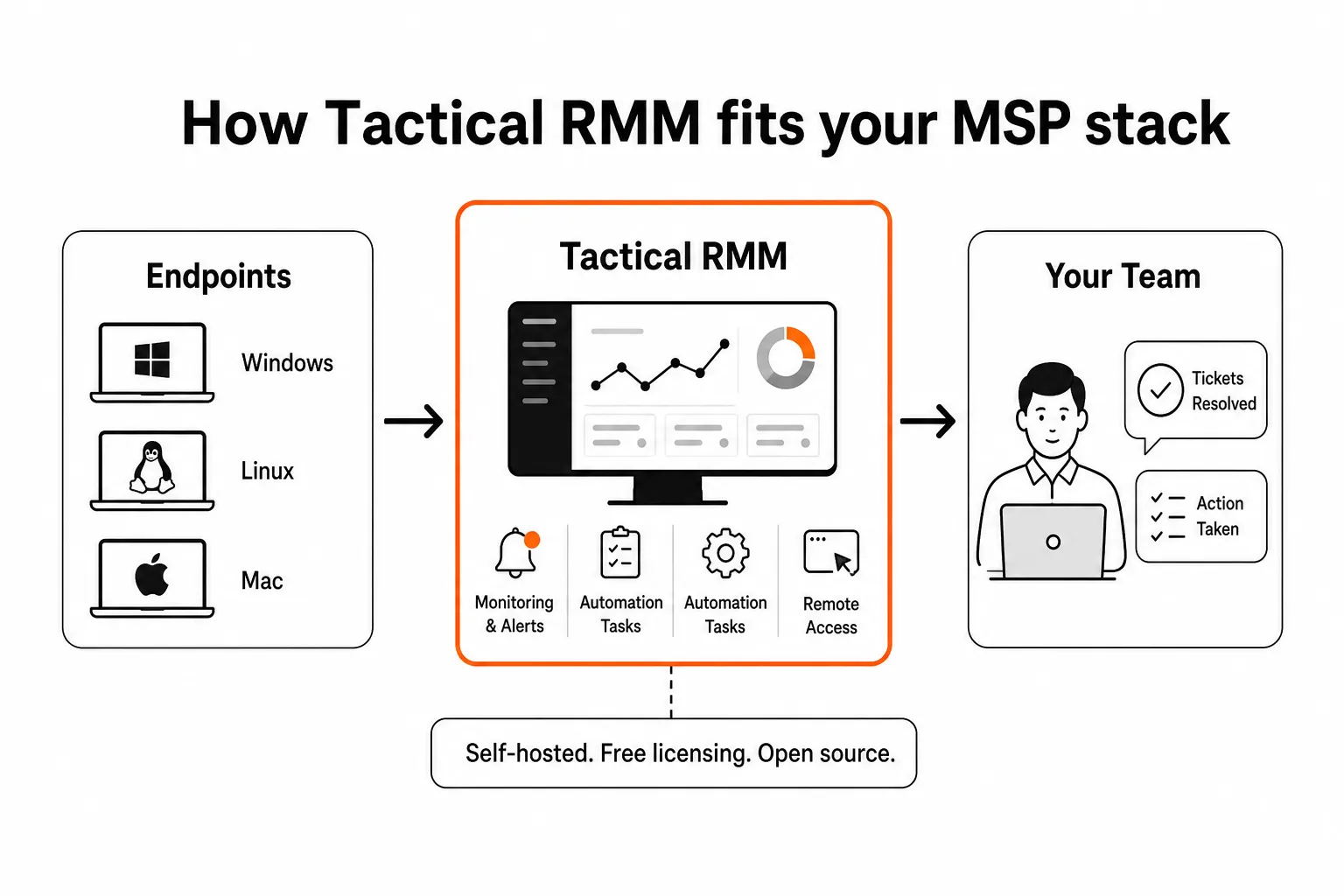
The agent-to-server connection runs over a secure encrypted channel. Role-based permissions let you create different access levels - a "Helpdesk Technician" role might have remote access but no ability to run scripts, while a "Super User" has everything. That kind of granular RBAC is something you'd normally pay enterprise prices for.
The community scripts repository at github.com/amidaware/community-scripts is one of the underrated benefits. MSPs have contributed hundreds of ready-to-run PowerShell, Python, and Bash scripts covering common tasks - disk cleanup, service restarts, software audits, user management. If you can think of a script you'd want, someone has probably already written it and shared it.
What Tactical RMM can do
Remote access and control
The remote desktop layer is powered by MeshCentral and works like TeamViewer - click a device, connect, and you're in a full graphical session without interrupting the user if you don't want to. There's also a real-time remote shell, a file browser for uploading and downloading files, and a Windows Registry Editor for the moments you need to get into the weeds.
"Silent" background access matters for managed service work. You can connect in the background, fix an issue, and never touch the user's active session. That's the difference between a support call that feels seamless and one where the user watches their mouse move around.
Scripting and automation
Scripting support covers PowerShell, Python, Bash, batch files, nushell, and deno. You write once, deploy to any group of devices, and Tactical RMM handles the execution and result logging. The automation task runner supports time-based scheduling (daily, weekly, monthly), event-triggered execution (run this script when a check fails), and onboarding automation for new agents.
The practical use case MSPs lean on: define a standard hardening script that runs the moment a new agent checks in, before anyone on your team has touched the device. No manual checklist, no forgotten step.
Patch management
Windows patch management is built in - you define policies, set maintenance windows, and the platform handles deployment. It's not quite as polished as NinjaOne's Patch Intelligence AI (which analyzes CVE data to flag potentially unstable patches before rollout), but it covers the fundamentals solidly: approval workflows, scheduling, compliance tracking.
If your shop runs mostly Windows endpoints and you need a reliable patch engine that doesn't cost you per device, this works.
Monitoring and alerting
The monitoring layer covers the usual suspects: CPU, disk, memory, services, scripts, and event logs. Alerts go out via email, SMS, or webhook - so you can pipe them into Slack, Teams, or your PSA of choice. Custom check intervals, configurable thresholds, per-client policies. Nothing surprising, all of it solid.
The thing that keeps showing up in community discussions is how fast the alerting is. The Go agent is lean enough that you're seeing near-real-time status on endpoint health, not something that batches updates every 15 minutes.
Cross-platform endpoint support
Windows agent support covers everything from Windows 7 through Windows 11 and Server 2025. Linux support includes any distro running systemd - Debian, Ubuntu, CentOS, Synology, FreePBX, Raspberry Pi. macOS runs on both Intel and Apple Silicon. The cross-platform reach is notable; a lot of the free/cheap RMM options in this space are Windows-only or treat Mac as an afterthought.
Worth flagging: Mac and Linux agents are sponsorship-tier features. If your environment is mostly Windows, the free tier covers you. If you're managing a mixed fleet at scale, factor the sponsorship cost into your math.

Software deployment
Chocolatey integration means you can push software installs to endpoints without building your own deployment pipeline. Define the package, target the devices, done. Not as slick as a full MDM, but sufficient for common MSP software deployment tasks.
What Tactical RMM costs
This is the part that makes commercial RMM vendors uncomfortable.
The self-hosted version of Tactical RMM costs $0 in licensing. Zero per agent, zero per device, zero per technician seat. You pay for the server infrastructure you run it on - a $20-60/month VPS is sufficient for most MSPs, and a reasonably spec'd server handles thousands of agents without strain.
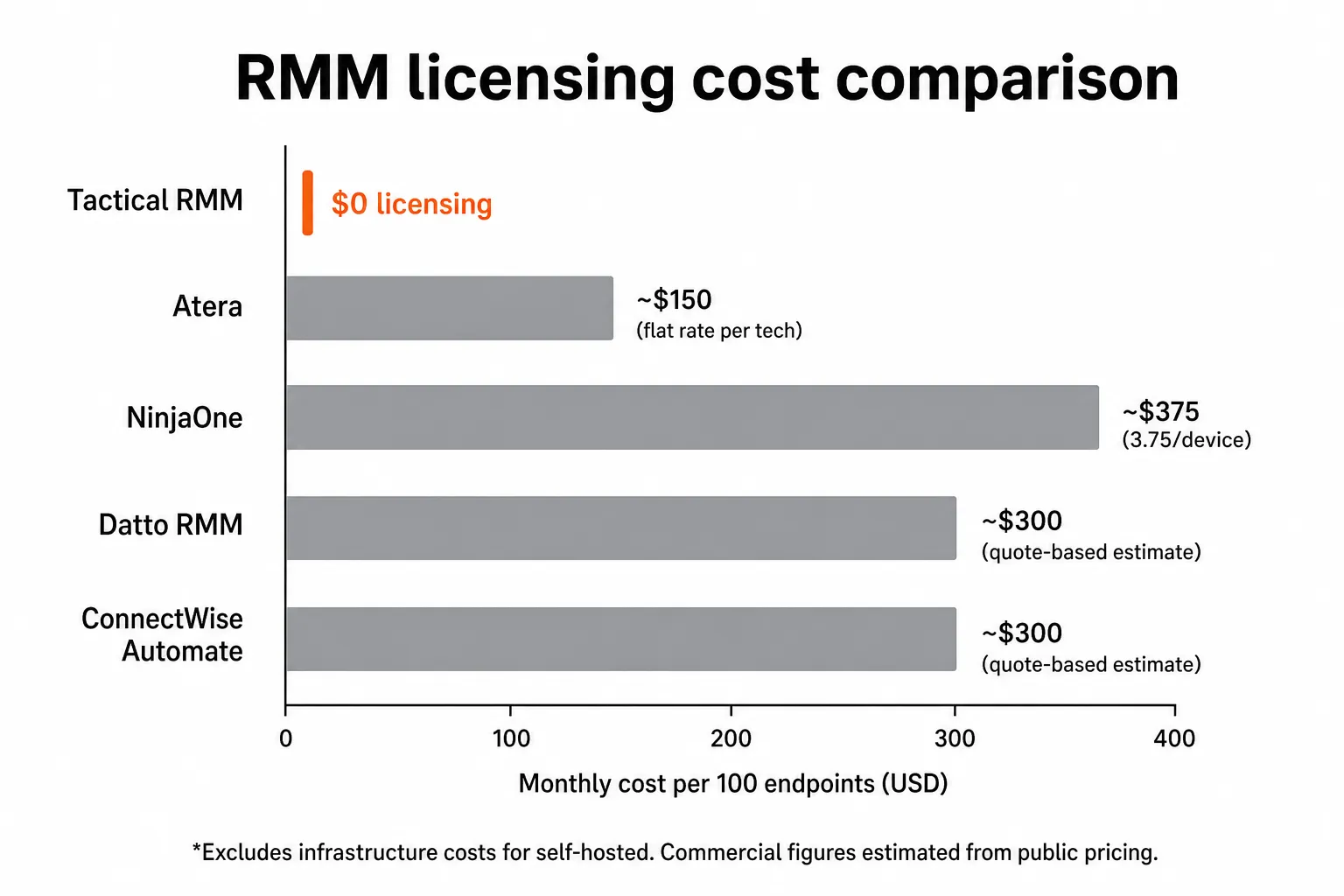
To put that in concrete terms: managing 500 endpoints with NinjaOne at roughly $3.75/device/month is $1,875/month in licensing. The equivalent Tactical RMM deployment costs you a $30-60 VPS bill plus your implementation time. At 1,000 endpoints, that gap gets very hard to ignore.
The features that cost extra (sponsorship tier):
- Mac and Linux agents
- Code-signed Windows agents (useful for security-conscious clients)
- Customizable reporting module
- Single Sign-On (SSO)
If you need Mac agent support in particular, check the current sponsorship pricing at tacticalrmm.com - the cost is still a fraction of what commercial alternatives charge per device.
One honest cost to include: your own time. Tactical RMM requires more technical setup than a SaaS RMM where you sign up and deploy agents the same afternoon. Installation takes a technically competent person a few hours. Expect some configuration work to tune it to your environment. That's not nothing - especially for smaller shops where every hour has a dollar value attached. We'll come back to who this trade-off works for.
What MSPs are actually saying
The r/msp community threads are unusually positive for a product discussion. MSPs are not a gentle audience - they've been burned by enough vendor promises to approach new tools with healthy skepticism. Tactical RMM consistently gets praise for:
"Complete control of production environment - no vendor lock-in. Faster than ConnectWise and Datto. Excellent documentation. Peace of mind after the Kaseya breach."
The Kaseya angle keeps coming up. After the VSA ransomware attack in 2021 hit hundreds of MSPs through their own tooling, a lot of shops started asking harder questions about supply chain trust. Source-available code you can read is a different kind of assurance than "trust us."
In a recent r/msp thread on RMMs for 5,000+ agents, users reported no performance issues at scale. That matters - a tool that handles 200 agents smoothly and falls apart at 2,000 is a growth blocker.
The concerns worth noting are equally honest: the setup learning curve is real, the project doesn't have enterprise SLA backing, and self-hosting means you own your uptime. If your team isn't comfortable standing up and maintaining a Linux server, the maintenance burden lands on you.
There was also a historical incident in early community days involving unsigned agent code that raised concerns. The founder addressed it publicly on r/msp, and the community largely moved past it - but it's worth knowing the history before putting it in front of clients.
Who should use Tactical RMM
Good fit:
- MSPs with technically capable staff who can handle server administration
- Shops managing 200-10,000+ endpoints where per-device licensing costs are material
- Teams that prioritize code transparency and self-sovereignty over your tooling
- MSPs migrating away from Kaseya or ConnectWise Automate who want maximum control
- Anyone running a mostly Windows fleet (the free tier covers this fully)
Not the right fit:
- Shops that need a fully managed, hands-off RMM experience from day one
- Teams without the technical depth to stand up and maintain a Linux server
- MSPs that need a built-in PSA or ticketing system in the same platform
- Environments where client compliance requirements mandate vendor-backed SLAs
For comparison: NinjaOne is the premium managed option - world-class UX, 23-quarter G2 leadership streak, onboarding that takes one week and a three-hour learning curve. You're paying for that polish. Tactical RMM is for the MSP who'd rather spend time on setup than money on licensing.
The gap no RMM closes on its own
Here's the part that doesn't show up in any RMM marketing: monitoring and alerting is not the same as resolution.
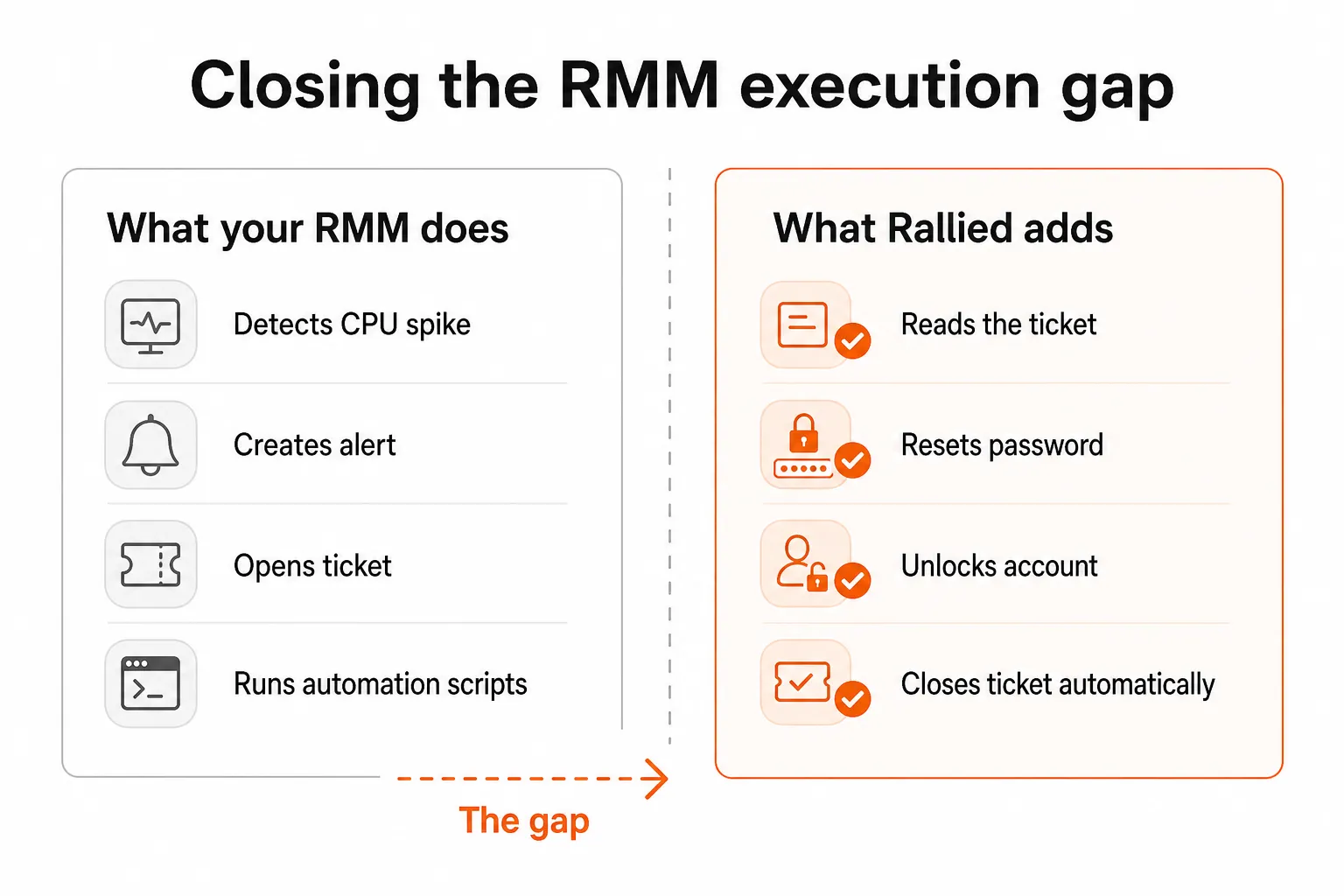
Your RMM - Tactical RMM included - is exceptional at detecting problems. CPU spike? Alert. Disk at 90%? Alert. Service stopped? Alert, then maybe a remediation script if you've configured one. And for machine-level issues, that automation chain works well.
But the tickets that eat most of your L1 hours aren't machine-level problems. They're user-reported requests: "I locked my account." "I need access to the shared mailbox." "New hire starting Monday, needs everything set up." "Contractor left last week, please revoke access."
Your RMM has no way to read a user's email, understand what they're asking for, connect to your identity provider, make the change, verify it worked, and close the ticket - all without a tech touching it.
That's the execution gap. And it's where most MSPs' L1 hours actually go.
Password resets alone account for roughly 18% of L1 ticket volume across MSPs. A human reset takes 5-15 minutes - find the user, navigate the identity provider, reset, email the user, update the ticket. At 200 tickets/month, that's 30-50 hours. At 400 tickets, the math gets uncomfortable fast.
The RMM is necessary but not sufficient. You need something that sits between the ticket arriving and the ticket closing - and does the work in between without human touch.
Try Rallied
Rallied is an AI technician built specifically for MSPs that works alongside your RMM, not instead of it. Connect it to your PSA, your RMM (Datto, NinjaOne - and support for Tactical RMM's API is part of the integration roadmap), your identity provider (Entra ID, Okta, JumpCloud, Google Workspace), and your documentation tool (IT Glue, Hudu), and it starts resolving tickets autonomously.

When a user emails "I'm locked out," Rallied reads the ticket, identifies the account, resets the password in your identity provider, verifies access is restored, notifies the user, and closes the ticket. No tech ever opens it. The same flow covers account unlocks, MFA issues, permission requests, onboarding, and offboarding.
The economics: $250/month for 500 tickets at $0.50 each. If Rallied handles 40-60% of those autonomously, you're recovering 200-300 technician-minutes per day of L1 work - time that goes back to billable projects or simply to not burning out your team on password resets.
Deployment is same-week. No workflow builder to learn, no 6-month implementation, no dedicated admin overhead. The founder's background in infrastructure automation at Indeed, Webflow, and OpenGov shows in how the product is architected - built to work out of the box, not to require a year of configuration before it's useful.
If you're running Tactical RMM because you want full control of your stack and don't want to overpay for tooling, Rallied fits the same philosophy: you get the execution capability without paying enterprise SaaS prices, and you see the ROI by end of week one.
Try it free at rallied.ai - 14-day trial, $50 in credit, no card required.
Frequently Asked Questions
Is Tactical RMM really free?
The self-hosted version of Tactical RMM is free to download and use with no per-agent or per-device licensing fees. You pay only for the server infrastructure to host it (typically $20-60/month on a VPS). Some advanced features - Mac/Linux agents, code-signed Windows agents, SSO, and the custom reporting module - require a paid sponsorship tier. For most MSPs, the core feature set covers everything they need at zero licensing cost.
How does Tactical RMM compare to NinjaOne?
Tactical RMM and NinjaOne cover similar core ground - remote monitoring, patch management, automation, and remote access - but they're built on fundamentally different models. NinjaOne is a polished SaaS product at roughly $3.75/device/month with world-class support and a 23-quarter G2 streak. Tactical RMM is self-hosted and free to license, with comparable feature depth and a highly active open-source community. NinjaOne wins on ease of setup and UX polish; Tactical RMM wins on cost and code transparency. The right choice depends on your team's technical depth and how much you value vendor independence.
Is Tactical RMM safe to use in production?
Yes - with appropriate context. Tactical RMM is source-available, meaning you can audit every line of code yourself, which is a meaningful security advantage over black-box commercial tools. There was a community incident years ago involving unsigned agent code, but it was addressed and the project has maintained transparency since. Thousands of MSPs run it in production at scale (5,000+ agents reported in r/msp threads). As with any self-hosted platform, security depends on how well you lock down your server infrastructure.
Can Tactical RMM handle 1,000+ endpoints?
Yes. Multiple MSPs in r/msp discussions report running Tactical RMM across 5,000+ agents without performance degradation. The Go-based agent is lightweight and the Django/Vue backend scales reasonably on modest hardware. That said, very large deployments (10,000+ endpoints) should test thoroughly and may need to tune server resources. The platform was built by an MSP owner who needed it to work at real scale - that origin story matters.
What does Tactical RMM not do that commercial RMMs do?
Tactical RMM doesn't include a built-in PSA or ticketing system (you'll need to integrate with ConnectWise, Autotask, or HaloPSA separately), and it doesn't autonomously resolve user-reported tickets on its own. Commercial platforms like NinjaOne offer deeper PSA integrations and broader third-party app catalogs. For autonomous ticket resolution - password resets, account unlocks, user onboarding - you'd pair Tactical RMM with an AI execution layer like Rallied, which connects to your RMM and identity stack to close tickets without human involvement.