
L1 ticket automation
Routine L1 tickets, resolved without a tech
Rallied takes first touch on every ticket in your PSA. It triages and dispatches, enriches the ticket, resolves the routine ones end to end, and escalates the rest with the work attached.
01 · Triage and dispatch
Every ticket sorted the moment it lands
Day or night, each inbound request gets read, classified, and put in front of the right person or the right automation, before anyone has looked at the queue.
- Categorized and routed.
- Type, priority, and board set on arrival using your rules and SLAs, on every ticket instead of the ones someone had time to review.
- Dispatched by load.
- Tickets that need a human land with the lowest-loaded tech, so the queue balances itself instead of piling on one person.
- Statuses stay true.
- The ticket moves through your board as the work happens, without a dispatcher pushing it along by hand.
02 · Enrich
The ticket arrives pre-investigated
Before a tech opens it, the ticket already carries everything they'd spend the first twenty minutes hunting down.
- Requester context attached.
- Who they are, what they run, and their history with this exact problem, in the notes before the ticket is opened.
- The related past ticket, found.
- The same issue from two weeks ago and how it was fixed, cited on the ticket. A new tech gets a starting place.
- Diagnosed, not summarized.
- Rallied reasons over live state from your connected systems to find the actual cause, so the ticket arrives with an answer, not a recap.
03 · Resolve
Routine tickets end closed
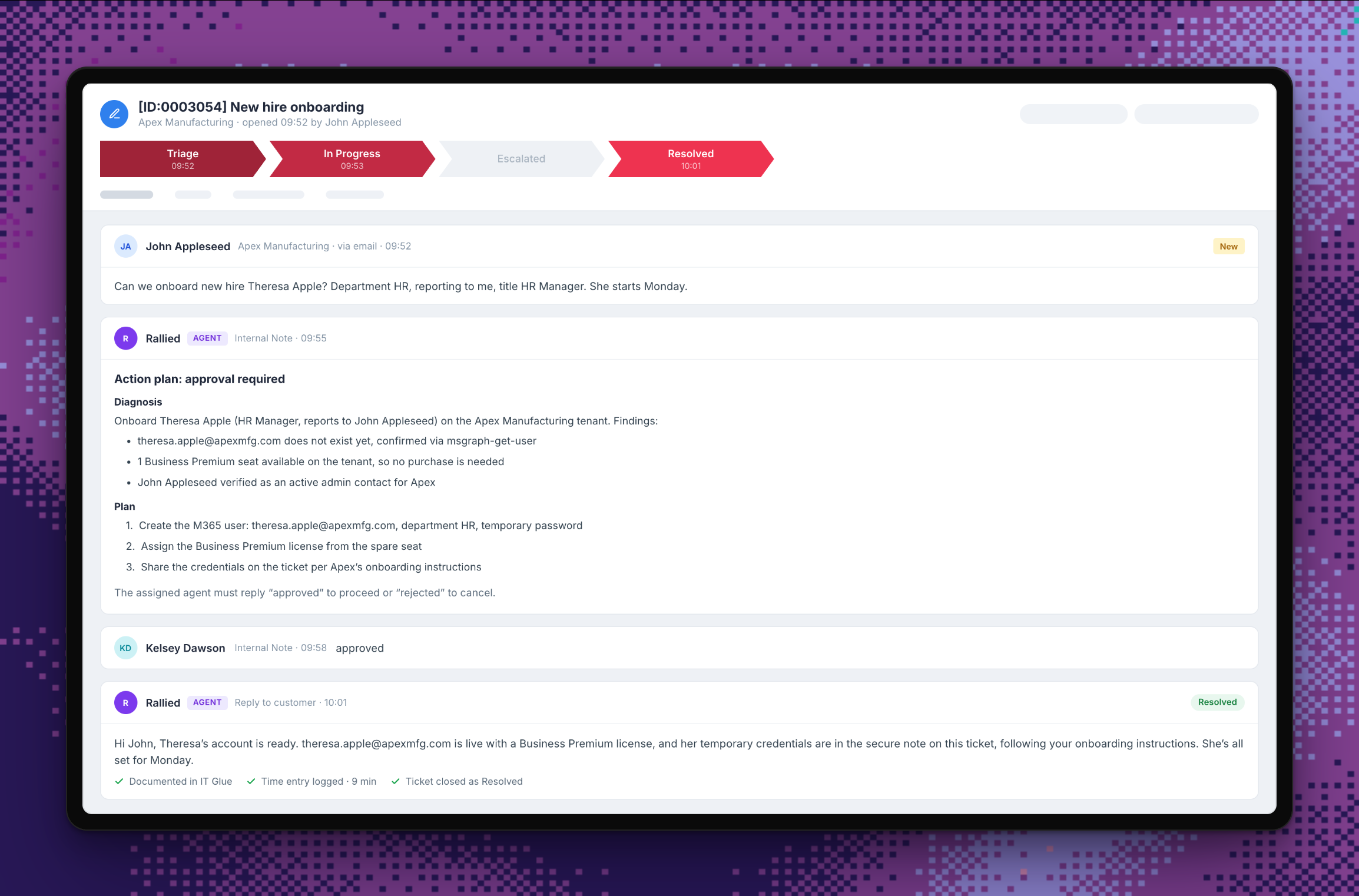
This is a live run of an offboarding ticket: the diagnosis, the plan, the one-word approval, and every step documented as it executes.
- Resolves and closes.
- Password resets, lockouts, access requests, shared mailboxes: Rallied does the work, updates the client, and closes the ticket.
- Approval where you want it.
- Plan Mode posts what it would do; Execute Mode does it. You decide per action and per client, and you can start with one client.
- Documented in the PSA.
- Notes, time entries, and the resolution land on the ticket as the work happens, so the record stays complete.
04 · Escalate
And when it isn’t routine
Follows your playbooks
Write a workflow in plain English and Rallied resolves matching tickets your way instead of its own. See Workflows
Escalates with the work attached
When a ticket needs judgment, it goes to a tech with the diagnosis and everything already tried on the ticket. Nobody starts from a blank page.
- Diagnosis: VPN drops trace to the client’s firewall, not the user’s laptop
- Tried: reissued the certificate, rebuilt the tunnel profile
- Client history and config backup linked on the ticket
Verified before it touches an account
Password and MFA resets can require the requester to confirm through Okta, Duo, or Traceless first, so a hacked mailbox can’t reset a password.
Asks the requester, not your techs
Missing details get collected from the end user in Teams or on the ticket, so a half-described request still moves.
Anything your connected tools can do: password resets, account unlocks, access requests, mailbox changes, group membership, onboarding and offboarding steps. You choose which actions run on their own and which wait for approval, per client.
Yes. Roll it out one client at a time or across the board, scope it by board and ticket type, and set Plan or Execute Mode per action. Read-only clients stay read-only.
It diagnoses from live system state, the client’s history, and your documentation rather than a script, so an unfamiliar ticket still gets a real diagnosis. If it can’t finish, it escalates with the work attached.
In the PSA they already use. Diagnoses and plans arrive as ticket notes, approvals are a one-word reply, and the ConnectWise pod or HaloPSA tab is there for questions mid-ticket.
Something we didn’t cover? Talk to an engineer
Show us the ticket your team is tired of seeing
Bring a shared mailbox request, a new-user setup, or another repeat ticket. We’ll show you how Rallied closes it, from request to done.