
TL;DR
An IT service catalog is a structured menu of every IT service you offer - with descriptions, pricing, SLAs, and request processes - that turns sales conversations from custom negotiations into consistent, repeatable closings. For MSPs, the business case is clear: standardized offerings reduce scope creep, speed quote-to-close, and let junior techs deliver consistently. But the MSPs we see winning right now have taken it one step further: they treat the catalog as an automation spec. If a service is routine enough to define clearly, it's automatable - and AI agents like Rallied can handle 40–60% of L1 request fulfillment autonomously, at $0.50 a ticket instead of 15 minutes of senior tech time. Build the catalog. Then automate the routine tier.
What is an IT service catalog?
Most people define an IT service catalog as "a list of IT services." That's accurate but understates what it actually does.
A well-built service catalog is the contract between what your MSP sells and what it delivers. It's the structured, customer-facing document that defines every service you offer - what it includes, what it doesn't, what it costs, what the turnaround looks like, and how to request it. Atlassian describes it as "an organized list of all the services your team offers, with clear request options and expectations" - which is right, but buries the operational weight.
For an MSP, the catalog is doing three things simultaneously:
- Sales tool. It replaces custom-scoped proposals with pre-defined packages. A customer who can see your helpdesk tier, monitoring tier, and backup tier - with pricing - makes faster decisions and has fewer objections.
- Operations spec. It defines what "done" looks like for every service. That's what lets junior techs deliver consistently and what makes onboarding new team members manageable.
- Governance foundation. When pricing, SLAs, and scope are written down, your margins don't erode in negotiation. The catalog is the floor; everything below it is a conversation.
By 2025, $3 trillion of the $5.4 trillion in annual technology spend was flowing through services, with 96% of service dollars partner-assisted. MSPs without a catalog are selling into that market with a handshake and a napkin. That works until it doesn't.
Service catalog vs. service portfolio
Quick clarification because it comes up constantly: a service portfolio covers all services - active, planned, and retired. The service catalog is the customer-facing slice of that: only the services currently available and deliverable. The portfolio is internal strategy; the catalog is what customers actually see and request from. If you're an MSP without enterprise ITSM complexity, you mostly just need the catalog.
What goes in an IT service catalog
Every line in your catalog needs six things: a plain-language name, a description written for a non-technical buyer, explicit scope (what's in, what's out), pricing, an SLA, and a request process. That's the minimum. Without all six, customers will fill in the blanks with their own assumptions - and those assumptions rarely match yours.
The service categories themselves vary by MSP, but the pattern that shows up consistently across ConnectWise's guide and MSP community discussions is this grouping:
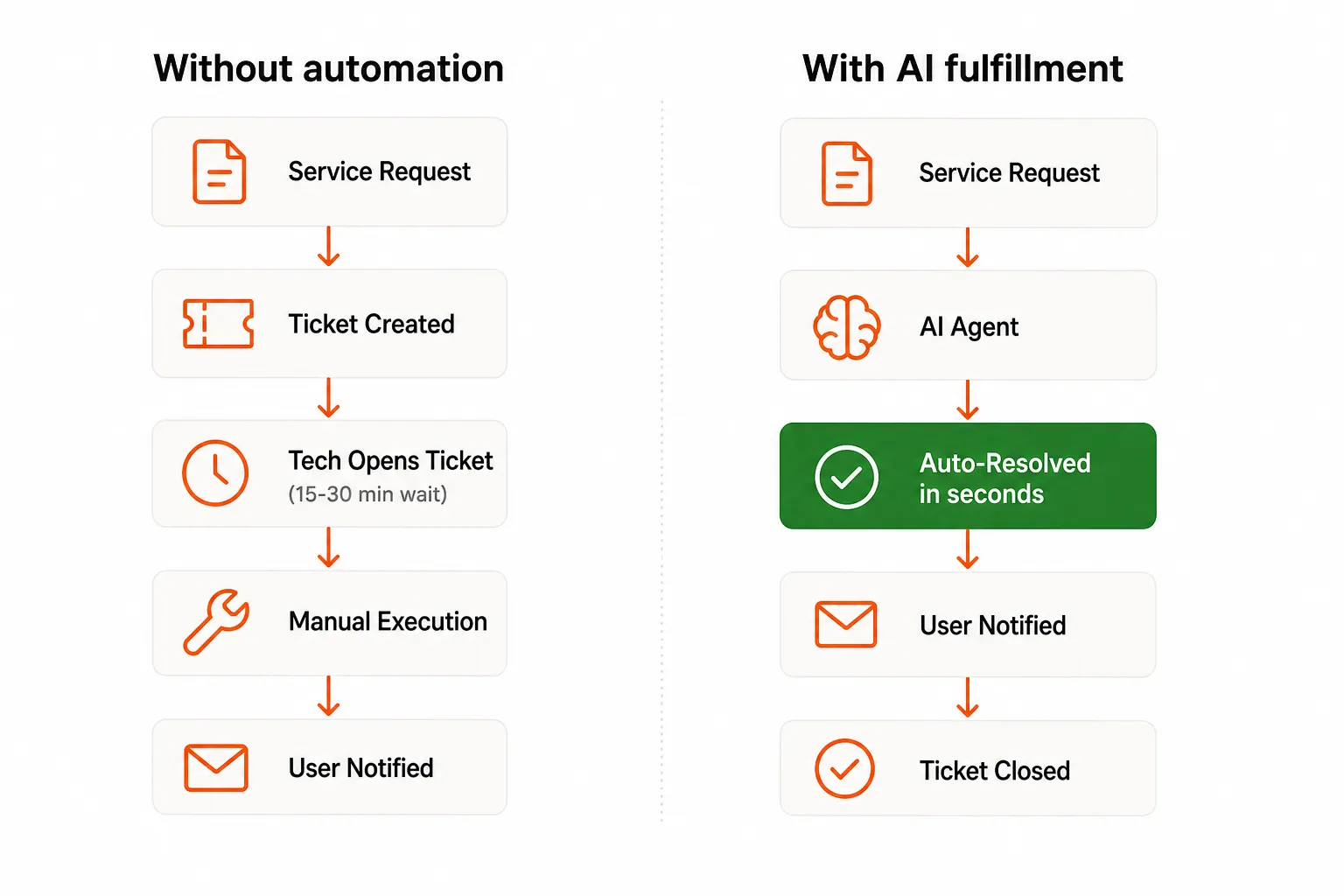
- Help desk & support - password resets, account management, software troubleshooting, hardware issues. This is almost always the highest volume category, and the one with the most automation potential (more on that below).
- Network services - firewall management, VPN setup, network monitoring, Wi-Fi optimization.
- Security & compliance - vulnerability scanning, endpoint protection, compliance audits, security awareness training.
- Backup & disaster recovery - cloud backup setup, recovery testing, DR execution. Pricing here typically runs $20–$100/site/month depending on data volume and recovery requirements.
- Cloud & M365 - cloud migration, M365 administration, Azure/AWS oversight, licensing management.
- Device management - endpoint management, MDM, device configuration, lifecycle management.
Within each category, individual services need the full treatment. "Password reset" isn't just a label - it needs a scope (covered for which accounts?), an SLA (resolution within 15 minutes during business hours?), a price (included in the help desk tier? per-incident?), and a request process (email, portal, phone?).
For pricing context: help desk runs $5–$30/user/month depending on tier and market; monitoring runs $8–$40/device/month. MSPs in high-cost markets like NYC or the Bay Area charge 20–30% more than rural counterparts.
How to build an IT service catalog
There's no single right approach, but there is a sequence that avoids the most common mistakes.
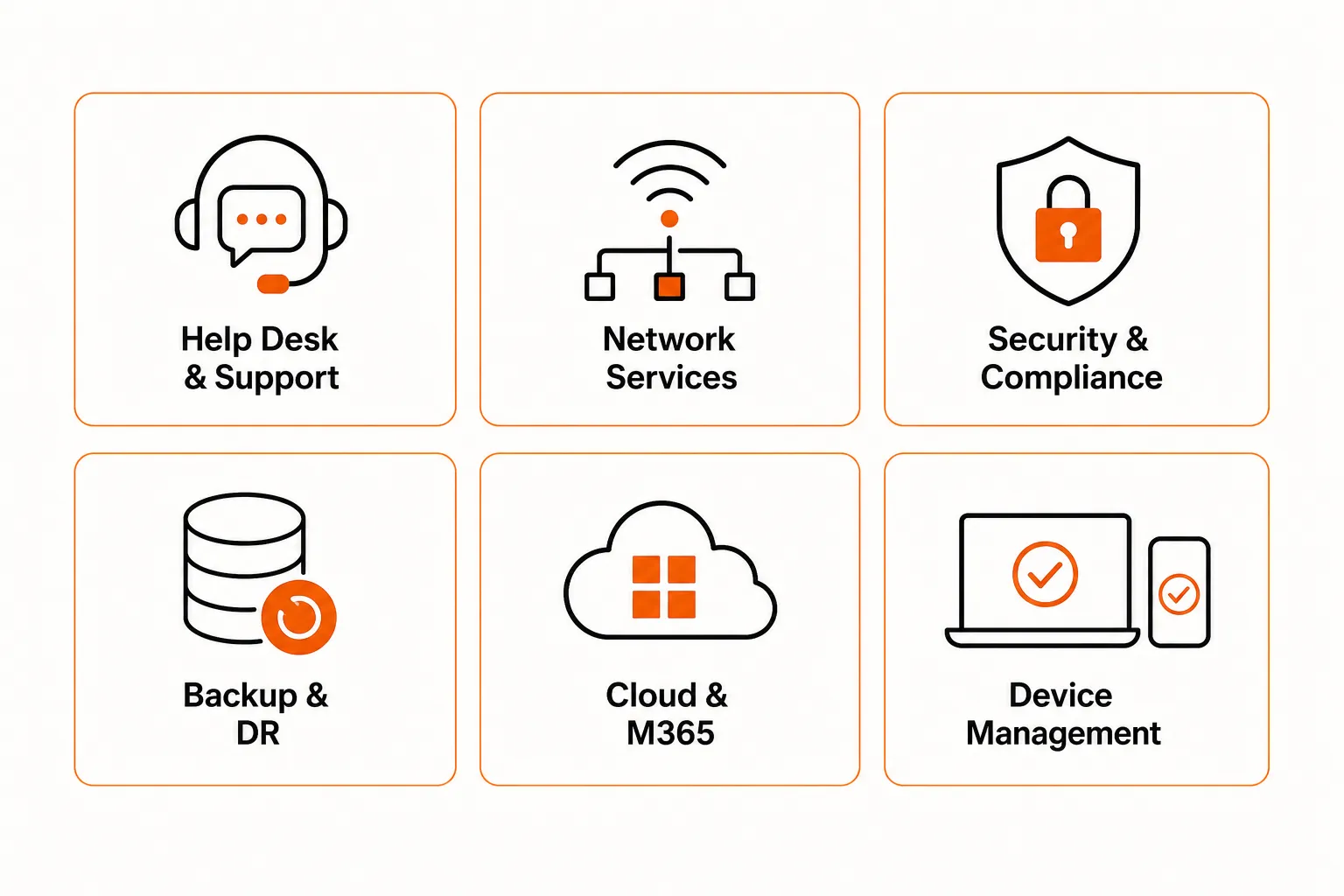
1. Inventory what you actually deliver. Before you can standardize, you need to know what's happening. Pull your ticket history for the past 90 days. What are your most common request types? What services are you delivering that you never formally scoped? Those are your catalog candidates.
2. Write descriptions for buyers, not techs. "Active Directory account unlock" means nothing to a CFO. "Account unlock - get back into your computer or email in minutes" lands. Write every description in plain language, focused on the outcome the customer gets. If you're finding it hard, try explaining the service to someone's parent.
3. Define pricing and SLAs explicitly. The community is consistent on this: publishing transparent pricing closes deals faster and reduces negotiation friction. Bundled tiers - "Essentials," "Professional," "Enterprise" - typically perform better than itemized per-service pricing because customers can make one decision instead of ten. Tiered bundles also reduce the scope-creep problem because customers know what they're entitled to.
4. Choose a delivery platform. For most MSPs, this means a PSA with an integrated end-user portal. ConnectWise PSA, Autotask PSA, and Halo PSA all have built-in catalog and portal functionality. The integrated approach - catalog item clicked in the portal, ticket auto-created in the PSA with pre-populated fields - shows much better customer adoption than disconnected tools. Jira Service Management works well for internal IT teams and enterprise scenarios.
5. Connect the request process. Decide how customers submit requests: portal, email, phone, or hybrid. Whatever you choose, the workflow needs to be documented - what happens the moment a request comes in, who handles it, what the escalation path is, how the customer gets notified. Undocumented fulfillment is where SLAs go to die.
6. Build in a quarterly review. This is the step 90% of MSPs skip, and it's why catalogs go stale. Assign an owner. Schedule a quarterly review. Check which services are being requested, which have missed SLAs, and which have become candidates for automation or retirement. A catalog that drifts from reality becomes a liability.
Tools MSPs use for service catalogs
Most MSPs don't need a dedicated service catalog platform - their PSA handles it, usually better than a standalone tool would. Here's what we see used most:
| Platform | Best for | Catalog feature |
|---|---|---|
| ConnectWise PSA | Mid-to-large MSPs, ConnectWise ecosystem | Built-in catalog, end-user portal, ticket routing |
| Autotask PSA | Datto RMM users, mid-market MSPs | Catalog templates, self-service portal |
| Halo PSA | MSPs wanting flexible customization | Full catalog management, customer portal |
| Jira Service Management | Internal IT teams, dev-forward environments | Strong portal, ITSM-grade catalog features |
The deciding factor is usually your existing PSA investment. If you're on ConnectWise, their catalog is good enough and the integration is seamless. If you're PSA-agnostic, Halo's flexibility earns it - it's particularly strong for MSPs with complex service offerings or multiple customer tiers.
The automation layer: closing requests without touching them
Here's the part most guides skip, because most guides were written before AI agents actually worked.
The service catalog defines what a service is. The automation layer closes the ticket without a tech ever opening it.
Take the help desk category. The single highest-volume service in virtually every MSP's catalog is password resets - accounting for roughly 18% of L1 ticket volume across the industry. A password reset takes a human tech 5–15 minutes: find the user in Active Directory or Entra ID, reset the credential, verify MFA, notify the user, close the ticket. Multiply that by 200 resets a month and you're looking at 25–50 hours of tech time - on one request type.
An AI technician like Rallied does the same thing in seconds. It reads the ticket, finds the user in your connected identity provider, executes the reset, verifies access, notifies the user, and closes the ticket. The tech never opens it.
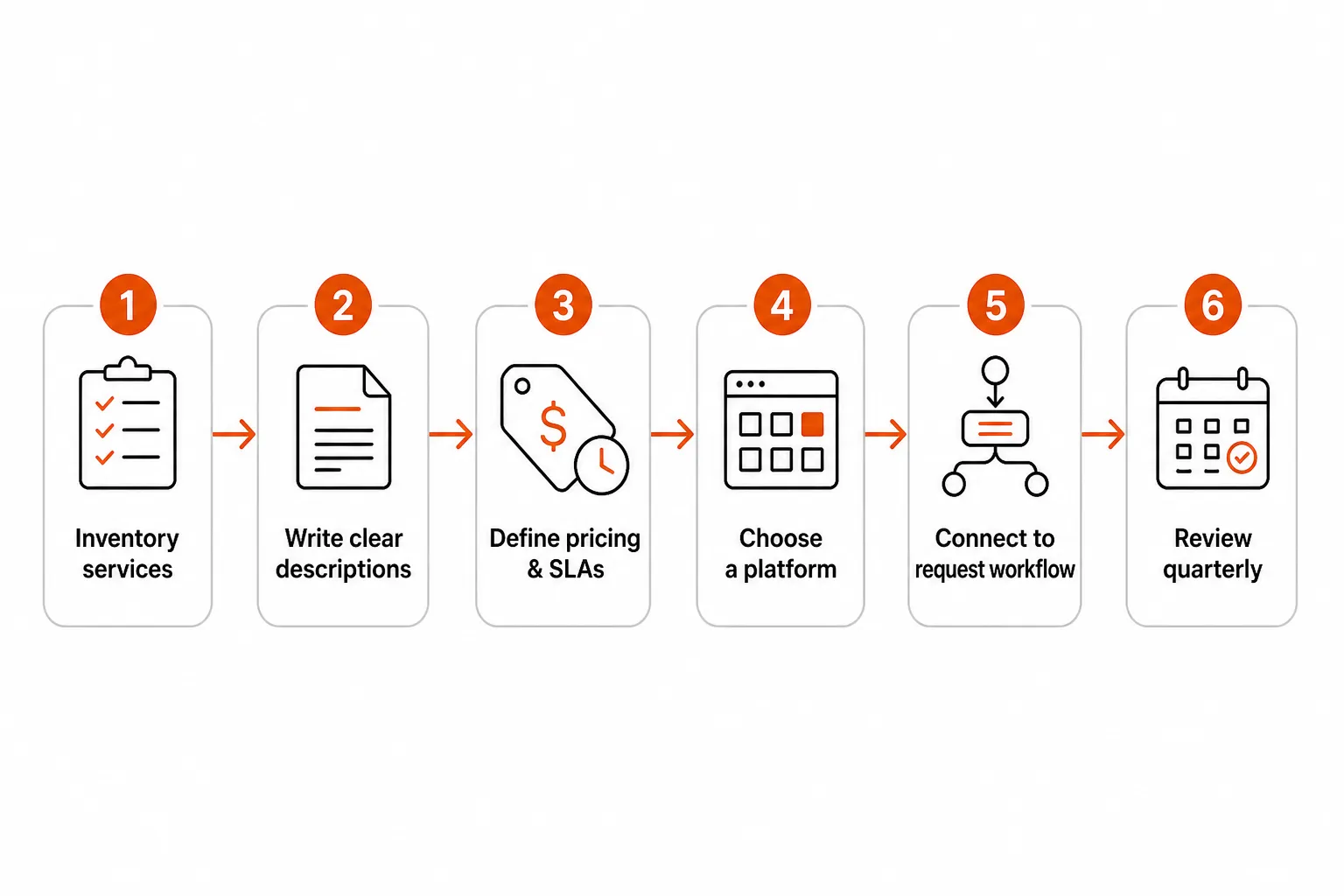
Rallied handles the full list of high-volume L1 and some L2 catalog requests autonomously:
- Password resets and account unlocks (Active Directory, Entra ID, Okta, JumpCloud, Google Workspace)
- MFA enrollment and device re-enrollment
- User onboarding and offboarding (M365 provisioning, group membership, license assignment)
- Permission and group membership changes
- Mailbox and shared folder access
- Basic software installs via RMM script execution
The economics change meaningfully. A tech handling a password reset costs roughly $7.50–$15 in loaded time (15–30 minutes at $30–$60/hr burdened). Rallied handles it for $0.50 per ticket. At 500 tickets a month - a small MSP's volume - that's $250 vs. $3,750–$7,500 in labor cost for just that ticket tier.
MSP owners discussing AI automation in community forums are consistent on this point: password resets and account unlocks aren't billable, they're not strategic, and they consume a disproportionate share of senior tech time each month. The goal isn't to work faster on them - it's to stop touching them entirely.
The connection to your service catalog is direct: the catalog defines which services are routine enough to standardize. If something made it into the catalog as a repeatable service, it's likely automatable. The catalog is, in effect, your automation roadmap.
This changes how you think about catalog structure, too. When you're building or refreshing your catalog, it's worth flagging services explicitly as "manual" or "automatable" - and pricing them accordingly. Automatable services can be priced more aggressively (better margins at lower price points), or used as a differentiator ("we handle this in seconds, not hours") when selling against competitors who are still having techs do it by hand.
Common pitfalls that kill adoption
Building the catalog is the easy part. Getting it adopted is where most efforts fail.
Catalog drift. The MSP community is consistent on this one: a catalog built once and never updated loses credibility fast. Services change, pricing changes, delivery processes change. A customer who relies on the catalog and finds wrong information stops trusting it - and stops using it. Quarterly review isn't optional; it's the maintenance schedule.
Sales teams that bypass it. We've seen this repeatedly: a well-built catalog that nobody in sales uses because custom quoting "feels faster." When that happens, the catalog becomes a marketing artifact, not an operations tool. Fix this by making the catalog the actual quoting source - integrate it with your CPQ so proposals pull from it automatically. ConnectWise CPQ and Autotask both support this.
No request process. A catalog without a request process is a brochure. If customers don't know how to request a service - or if the request process is so painful they default to calling anyway - the catalog doesn't actually deflect ticket volume or speed delivery.
Under-pricing automation candidates. This is subtler but real. MSPs sometimes price automated services (password resets, account unlocks) the same as manual services, losing the margin advantage that automation creates. If Rallied is resolving a ticket for $0.50 that customers are paying $15/user/month to have available, the economics are strong. Don't hide that.
Try Rallied

Rallied is an AI technician built specifically for MSPs. It connects to your PSA, RMM, identity providers, and documentation tools, then autonomously handles the L1 and L2 requests your service catalog defines as routine - password resets, account management, onboarding, offboarding, MFA enrollment - without a tech ever touching the ticket.
The differentiator isn't the capability list; it's the deployment story. Rallied is live the same week you connect it. No workflow builder, no 6-month implementation, no dedicated admin overhead. Connect your tools, it starts working.
At $0.50 per ticket with a 14-day trial and $50 in free credit (no card required), the math is visible before you commit. Most MSPs see the economics clearly by day three.
If your service catalog includes high-volume L1 services - and virtually every MSP's does - Rallied closes those tickets while your techs work on the things that actually need a human.
Frequently Asked Questions
What is an IT service catalog?
An IT service catalog is a structured, organized list of all the IT services an organization or MSP offers, presented with clear descriptions, pricing, SLAs, and request processes. It acts as a 'menu' customers can browse to understand what's available, how to request it, and what to expect. For MSPs, it's both a sales tool and an operations foundation. Learn more at Atlassian's ITSM guide.
What's the difference between a service catalog and a service portfolio?
A service portfolio covers all services - current, planned, and retired. The service catalog is the customer-facing subset: only active, available services. The portfolio is internal strategy; the catalog is what customers actually see and request from. Most MSPs only need to worry about the catalog.
How much should MSPs charge for help desk services?
Pricing varies by market and tier, but typical MSP help desk pricing runs $5–$15/user/month for basic support (password resets, software troubleshooting, hardware issues) and $15–$30/user/month for premium tiers that add on-site visits or after-hours coverage. High-cost markets like NYC or the Bay Area tend to run 20–30% higher than rural markets. Bundled tiers ('Essentials,' 'Professional,' 'Enterprise') usually close faster than itemized pricing.
Can I automate IT service catalog requests?
Yes - and this is where the real leverage is. For high-volume, routine services like password resets, account unlocks, user provisioning, and MFA enrollment, AI agents like Rallied can handle 40–60% of L1 and L2 requests autonomously. The service catalog defines what the service is; Rallied fulfills it without a tech ever opening the ticket. Cost drops from 15 minutes of tech time to seconds of automated execution.
What are the most common mistakes when building an IT service catalog?
The top three: (1) Catalog drift - building it once and never updating it, so it becomes stale and loses credibility over time. (2) Underutilization - the catalog exists but sales and ops teams don't use it, so custom quoting continues and the catalog serves no one. (3) Missing governance - no assigned owner, no quarterly review cycle, no pricing discipline, so margins erode and the catalog diverges from actual delivery. Fix these with clear ownership and a mandatory quarterly review.