
TL;DR
- Freshdesk is the best all-around pick for most small businesses - generous free tier, solid AI, reasonable paid plans starting at $19/agent/month.
- Zoho Desk wins on price if budget is your tightest constraint - $7/agent/month for the Express plan, with a genuinely useful free tier.
- HubSpot Service Hub makes obvious sense if you're already in the HubSpot CRM ecosystem.
- Help Scout is the cleanest option for small email-first support teams who don't want a maze of settings.
- Jira Service Management is the right call for internal IT helpdesks and dev-adjacent teams.
- Zendesk has the deepest feature set but costs a lot more to unlock it - better suited to teams that are actively scaling.
Choosing help desk software for a small business shouldn't be a six-week evaluation. But somehow, it always ends up that way - demos, feature comparison spreadsheets, sales calls from reps who have no idea what you actually need.
So here's the honest version. We looked at 6 of the most-used help desk platforms, checked what real users say on G2, and matched each tool to the team it actually fits - with real pricing, not the "starting at" number buried four clicks into their website.
No fluff. Let's get into it.
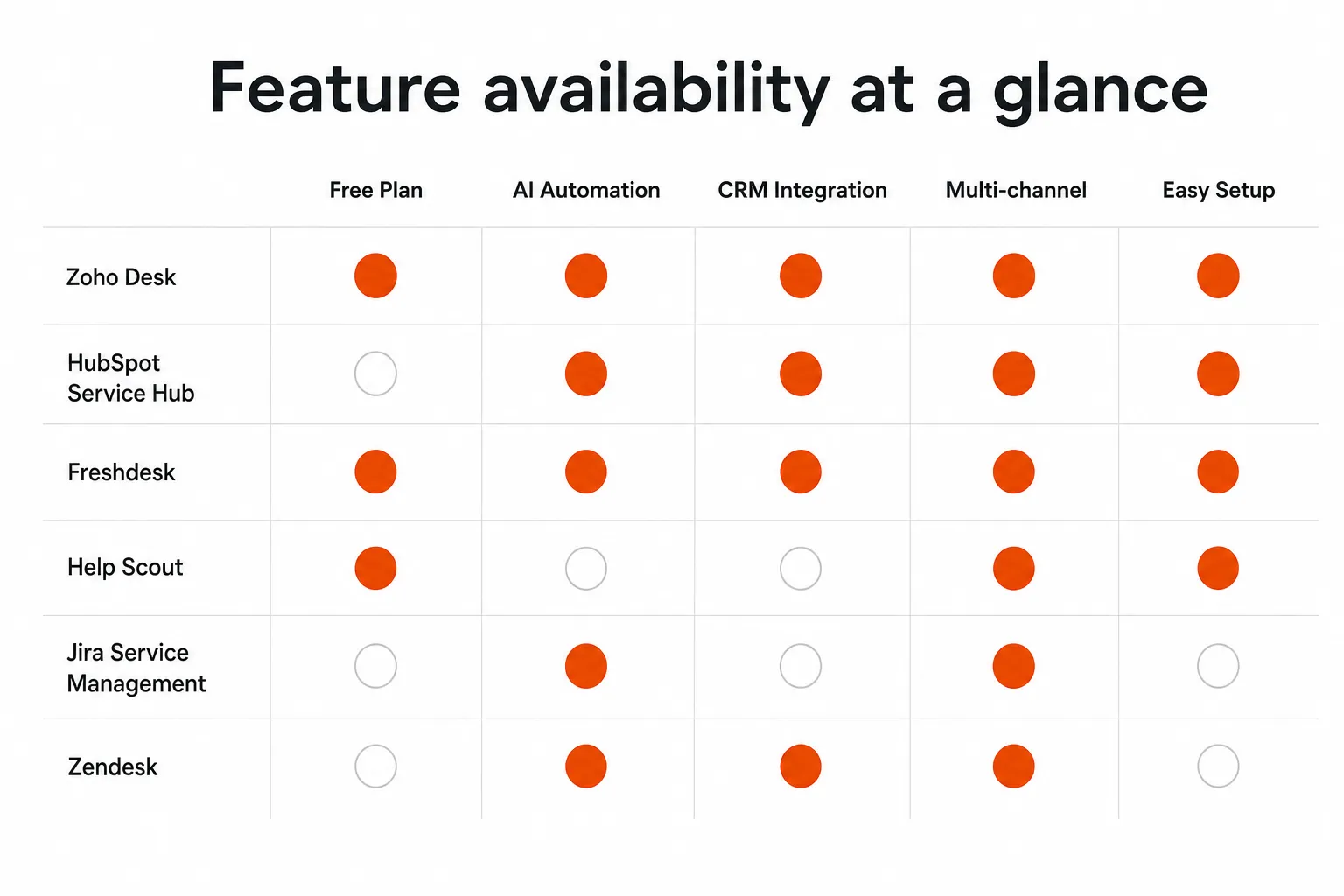
Feature availability at a glance
The 6 best help desk platforms for small businesses
1. Freshdesk - Best overall for small business

G2 rating: 4.4/5 (3,751 reviews) | Customers: 74,000+
Freshdesk is the help desk software that most small businesses end up sticking with - and for good reason. It covers the full stack (email, chat, phone, social) without forcing you into a bloated enterprise contract. The free plan is actually usable (unlimited agents for basic ticketing), and when you do outgrow it, the Growth plan at $19/agent/month is one of the more reasonable entry points in the market.
Freddy AI, Freshdesk's AI layer, isn't just marketing. It auto-categorizes, prioritizes, and routes tickets, and the company claims it resolves around 30% of tickets without agent involvement. Whether your team hits that number depends on how well you've set up your knowledge base, but the underlying capability is real.
Pricing:
- Free - unlimited agents, email + social ticketing, knowledge base (first 6 months for some plans)
- Growth - $19/agent/month (annual billing)
- Pro - $55/agent/month (annual billing)
- Enterprise - $89/agent/month (annual billing)
What users actually say:
"Freshdesk is easy to set up and use. The ticketing system is intuitive and the automation features save us a lot of time." - G2 reviewer, small business
"The reporting could be more robust on lower-tier plans, and some advanced automation features are only available on higher tiers." - G2 reviewer
Best for: Small businesses that want a full-featured help desk without a six-month implementation. Email + chat + basic AI, all in one place, at a price that doesn't require board approval.
Not ideal for: Teams that need deep CRM integration out of the box, or internal IT helpdesks that think in assets and incidents rather than customer tickets.
2. Zoho Desk - Best for tight budgets

G2 rating: 4.4/5 (7,731 reviews) | Part of: Zoho ecosystem
If you're genuinely trying to keep the bill down, Zoho Desk is where you end up. The free plan allows 3 agents with unlimited tickets - which is surprisingly capable for a one- or two-person support team. When you scale, Express at $7/agent/month is the cheapest real paid tier in this comparison by a meaningful margin.
The tradeoff is interface complexity. Zoho Desk has a lot of features, and finding them is not always intuitive. Teams that live inside the Zoho ecosystem (Zoho CRM, Zoho Books, etc.) will find the integrations seamless. Everyone else will spend a bit more time in the settings.
Zia, Zoho's AI assistant, handles sentiment analysis, anomaly detection, and ticket auto-tagging. It's capable on the higher tiers, though on Express and Standard you're working with a more limited version.
Pricing:
- Free - 3 agents, email channel, basic automation
- Express - $7/agent/month (annual billing)
- Standard - $14/agent/month (annual billing)
- Professional - $23/agent/month (annual billing)
- Enterprise - $40/agent/month (annual billing)
Annual billing saves approximately 34% vs monthly.
What users actually say:
"The free version offers impressive features, and even the paid tiers are very affordable for small businesses. The Zoho ecosystem integration is a major plus." - G2 reviewer
"The UI can feel cluttered, and there's definitely a learning curve if you're new to Zoho. Support response times have been inconsistent." - G2 reviewer
Best for: Budget-constrained small businesses, solo support operators, or teams already invested in the Zoho ecosystem. The price-to-feature ratio is genuinely hard to beat at the lower tiers.
Not ideal for: Teams who prioritize UX simplicity or need tight integration with non-Zoho CRM tools.
3. HubSpot Service Hub - Best for HubSpot CRM users

G2 rating: 4.4/5 (2,915 reviews) | Part of: HubSpot platform
The pitch here is simple: if your team already uses HubSpot CRM, Service Hub is the most frictionless way to handle support tickets. Every ticket is connected to a contact record, every interaction logs to the deal timeline, and your sales and support teams are looking at the same data. For a small business that's trying not to stitch together a bunch of separate tools, that's meaningful.
The free plan is genuinely functional - you get a shared inbox, ticketing, and basic live chat. The Starter plan at $7/seat/month (annual) is competitive with Zoho for entry-level pricing.
The issue is the Professional tier: at $90/seat/month, it's a significant jump, and that's where a lot of the AI and automation features live. Small teams that need the full feature set but don't have HubSpot's CRM already in place are probably better off with Freshdesk.
Pricing:
- Free - shared inbox, ticketing, basic live chat, HubSpot CRM included
- Starter - $7/seat/month (annual billing), $10/seat/month (monthly)
- Professional - $90/seat/month (annual billing)
- Enterprise - $150/seat/month (annual billing)
What users actually say:
"The integration with HubSpot CRM is seamless. Having all customer interactions in one place has made our team significantly more efficient." - G2 reviewer
"The jump from Starter to Professional is steep. Many features I expected at Starter require an upgrade. It feels like you're constantly being pushed to the next tier." - G2 reviewer
Best for: Small businesses already on HubSpot CRM, or teams that want sales and support data fully unified from day one.
Not ideal for: Teams that aren't in the HubSpot ecosystem and don't want to pay for features they won't use. The pricing cliff between Starter and Professional is real.
4. Help Scout - Best for email-first small teams

G2 rating: 4.4/5 (428 reviews) | Focus: Email + docs
Help Scout is the smallest-feeling tool in this list - in a good way. It's built for teams that mostly run support via email and want a shared inbox that doesn't feel like enterprise software. Setup is quick. The UI is clean. There's no 47-tab settings menu to wade through before your first ticket lands.
The free plan covers up to 5 users, which is rare at this price point (free). Standard at $25/user/month is more expensive than Freshdesk's Growth plan on a per-seat basis, but you're trading raw features for simplicity and polish.
AI Answers is Help Scout's self-service AI - it answers customer questions automatically using your Docs content. Pricing is usage-based at $0.75 per resolved conversation, which is worth knowing upfront. For teams with a well-built knowledge base and high repeat-question volume, it pays off. For everyone else, it can add up.
Pricing:
- Free - up to 5 users, 1 mailbox, 1 Docs site
- Standard - $25/user/month (annual billing)
- Plus - $45/user/month (annual billing)
- Pro - $75/user/month (annual billing)
- AI Answers - $0.75/resolved conversation (add-on)
What users actually say:
"Help Scout just works. Clean, fast, and my team picked it up in an afternoon. No training needed." - G2 reviewer
"It's great for email support but if you need robust multi-channel support or advanced reporting, you'll hit the ceiling quickly." - G2 reviewer
Best for: Small customer support teams (1–10 people) who run primarily on email, value simplicity, and don't need phone or advanced omnichannel features.
Not ideal for: Teams that need multi-channel support beyond email + chat, or businesses with complex routing and escalation logic.
5. Jira Service Management - Best for internal IT helpdesks

G2 rating: 4.2/5 (775 reviews) | Customers: 60,000+
Jira Service Management is built differently from the other tools on this list - it's designed around ITSM (IT Service Management) workflows, not customer-facing support queues. If you're running an internal IT helpdesk, managing incidents and change requests, or your team lives in Jira Software already, JSM is the obvious fit.
The free plan covers 3 agents - fine for a small IT team. Standard at $20/agent/month is in line with Freshdesk's Growth plan pricing but comes with change management, incident management, and a service catalog that customer-focused tools don't offer.
Forrester calculated a 275% ROI over three years for JSM deployments - though that study was likely based on larger teams than the typical small business. Still, the ITSM depth is real.
Pricing:
- Free - up to 3 agents, basic ITSM workflows
- Standard - $20/agent/month (annual billing)
- Premium - $51.42/agent/month (annual billing)
- Enterprise - custom pricing
What users actually say:
"For an IT team already using Atlassian products, this is a no-brainer. The integration with Jira Software and Confluence is tight, and the ITSM features are genuinely useful." - G2 reviewer
"The learning curve is steep if you're not familiar with Jira. Configuration can get complex quickly, and it's probably overkill for small customer support teams." - G2 reviewer
Best for: Internal IT teams, dev-adjacent support operations, and businesses already on Atlassian. If you think in SLAs, incidents, and change requests - not customer tickets - this is your tool.
Not ideal for: Customer-facing support teams. The interface is built for IT pros, not generalist support agents, and it shows.
6. Zendesk - Best for teams that are actively scaling

G2 rating: 4.3/5 (6,989 reviews) | Customers: 130,000+ brands
Zendesk is the most recognized name in help desk software for a reason - it has the deepest feature set, the most mature integrations marketplace (1,500+ apps), and the most flexibility for complex support operations. It's used by companies at every stage, from early startups to enterprise.
But it's worth being direct: Zendesk is expensive, and the gap between the entry plan and the feature set you probably want is wide. The Support Team plan at $19/agent/month is genuinely basic. Most teams that want AI, advanced analytics, or omnichannel end up on the Suite Team plan at $55/agent/month minimum. Add Copilot ($50/agent/month), Workforce Engagement ($50/agent/month), or Advanced AI, and the bill climbs fast.
For a small business that plans to stay small, the cost-to-value ratio is hard to justify vs. Freshdesk or Zoho. For a team that's genuinely scaling support operations and needs the integrations and reporting to match - Zendesk earns its place.
Pricing:
- Support Team - $19/agent/month (annual billing)
- Suite Team - $55/agent/month (annual billing)
- Suite Growth - $89/agent/month (annual billing)
- Suite Pro - $115/agent/month (annual billing)
- Enterprise - custom pricing
- Copilot add-on - $50/agent/month
- Workforce Engagement add-on - $50/agent/month
What users actually say:
"Zendesk is incredibly powerful once you get it configured. The integrations and reporting capabilities are best in class." - G2 reviewer
"It's expensive, especially once you start adding features. And the learning curve is real - it took our team months to get it dialed in." - G2 reviewer
Best for: Growing businesses with complex support needs, large agent teams, and the budget to unlock the full platform. Also strong for teams that need deep integrations with the wider SaaS stack.
Not ideal for: Small teams on tight budgets, or businesses that need to be up and running fast. There's a setup cost here - in time and money.
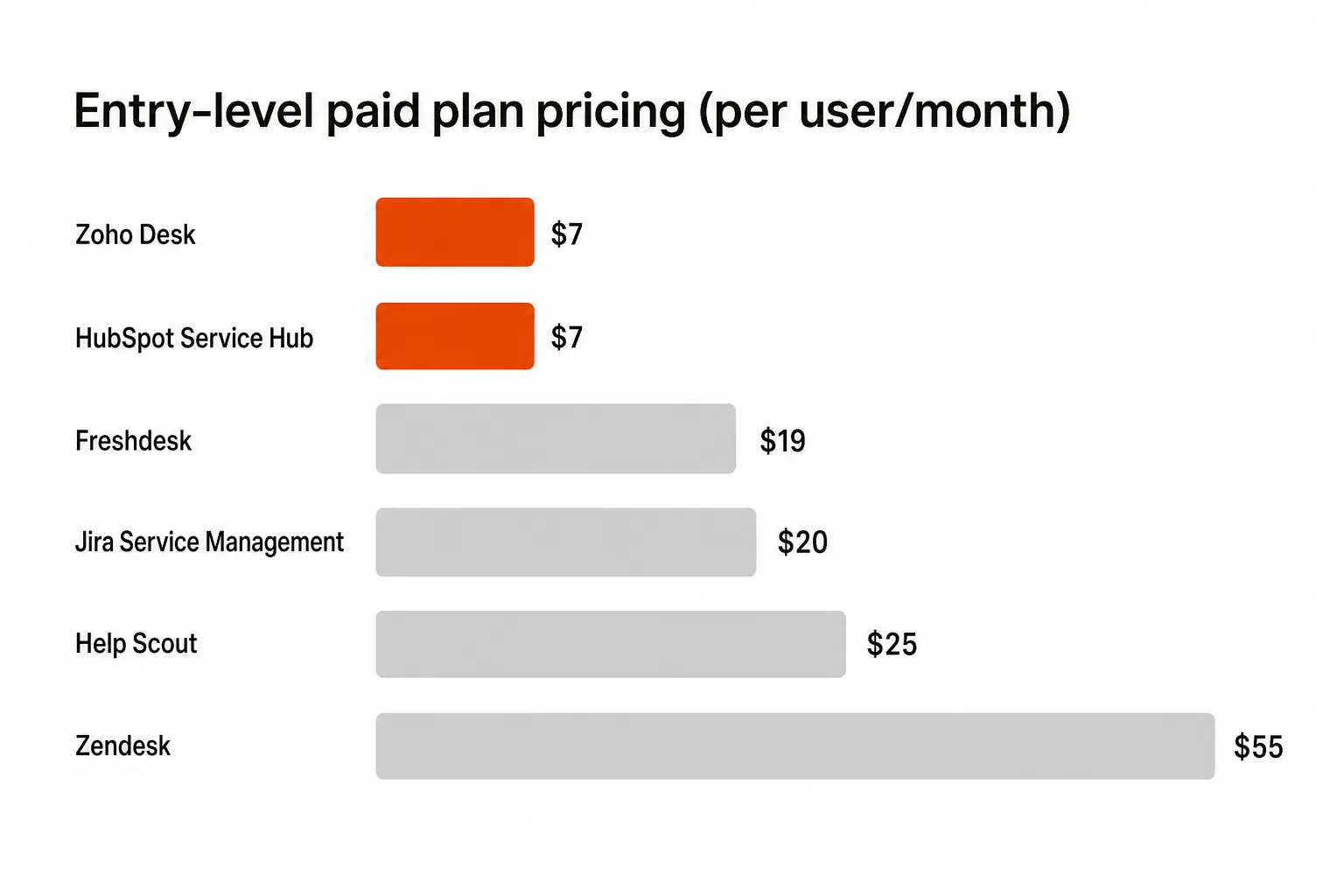
Entry-level paid plan pricing comparison
Which help desk is right for your team?
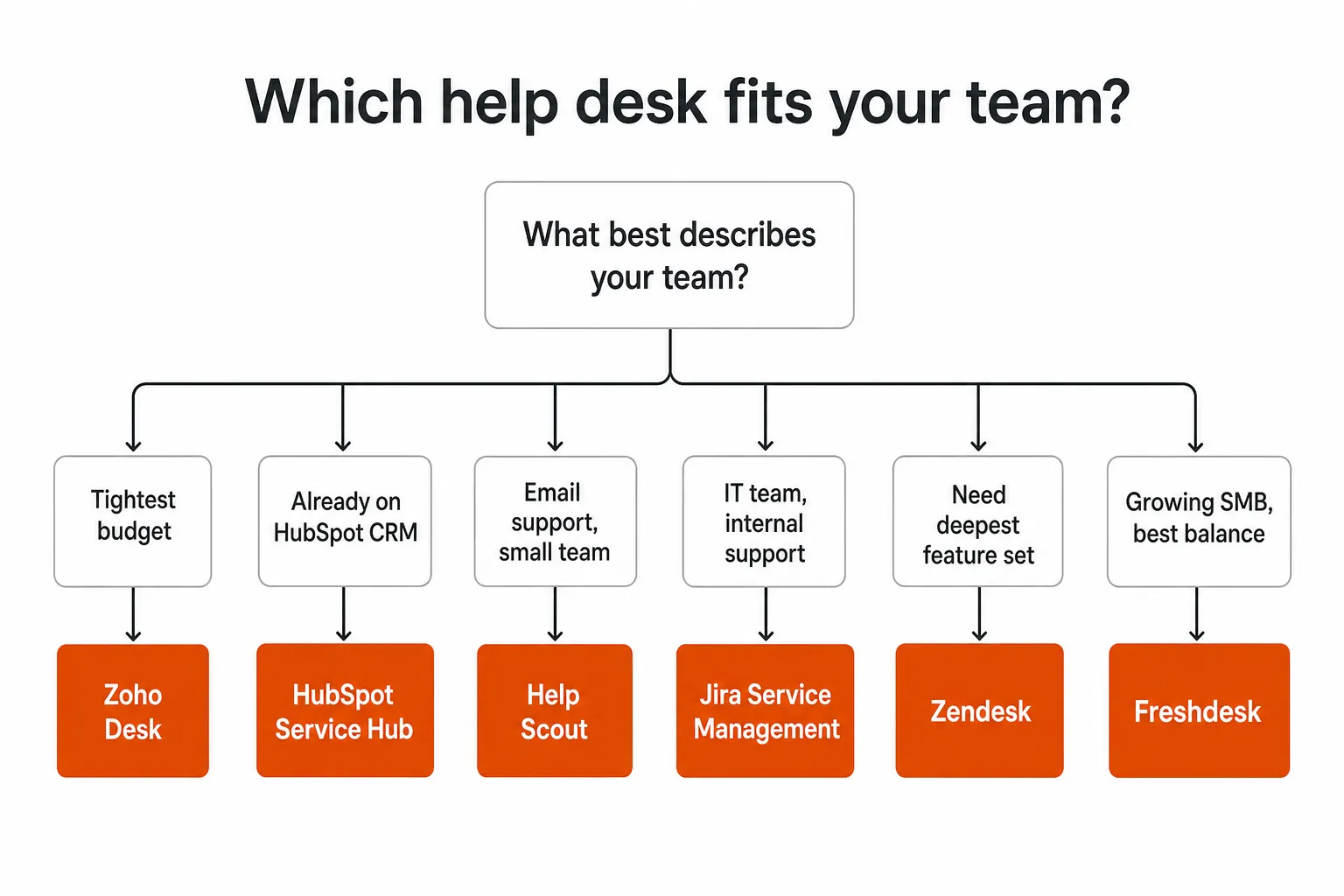
If you're still unsure after the individual reviews, here's the quick version:
- Tightest budget → Zoho Desk
- Already on HubSpot CRM → HubSpot Service Hub
- Email support, small team → Help Scout
- IT team, internal support → Jira Service Management
- Need the deepest feature set and are scaling → Zendesk
- Growing SMB, best balance of price and capability → Freshdesk
What to actually look for in help desk software
Before you sign up for any trial, nail down these five things:
1. How many channels do you actually need? Email-only teams are spoiled for choice. As soon as you add live chat, phone, and social in the same queue, your options narrow and your price goes up. Don't pay for channels you don't use today.
2. What does your free-to-paid upgrade path look like? Freshdesk's free plan is generous - but the features you'll eventually want (better reporting, more automations) are in the Growth plan. HubSpot's free plan is also strong, but the jump to Professional is steep. Know where the cliff is before you get comfortable.
3. How much setup time can you actually commit? Zendesk and Jira can do almost anything - once they're configured. Freshdesk and Help Scout can have you handling tickets on day one. Be honest about your team's capacity for setup and ongoing administration.
4. Do you need AI automation, or just ticketing? All six platforms have some AI features. None of them are magic. The ones that actually reduce ticket volume require a well-maintained knowledge base and enough historical ticket data to train on. If you're starting fresh, the AI is a future benefit, not a day-one ROI.
5. What integrations are non-negotiable? Most of these tools integrate with Slack, Shopify, Stripe, and the usual suspects. Where things diverge is depth of CRM integration (HubSpot wins on HubSpot, Zoho wins on Zoho) and ITSM tool ecosystem (Jira wins for Atlassian shops). Check your stack before committing.
For MSPs: the help desk conversation looks different
If you're a managed service provider reading this - or if you're evaluating tools to support clients' internal helpdesks - the calculus changes.
MSPs aren't just handling customer questions. You're resolving L1 and L2 tickets across dozens of client environments: password resets, account unlocks, onboarding, offboarding, access management. The standard help desk tools above handle ticket tracking well enough, but they're not built to execute work inside your clients' stacks.
That's the gap Rallied was built for.

Rallied is an AI technician that connects directly to your PSA (ConnectWise, Autotask, Halo PSA, SuperOps), RMM (Datto, NinjaRMM), identity layer (M365, Entra ID, Okta, JumpCloud, Google Workspace), and documentation (IT Glue, Hudu). It doesn't summarize tickets or suggest actions - it resolves them. Password reset comes in, Rallied handles it. Account unlock, onboarding, offboarding - same story.
The typical MSP running Rallied recovers 50–100 hours of L1 grunt work per month. At $125–$150/hour tech rates, that's $7K–$15K in freed-up capacity monthly - capacity that can go toward billable project work instead of ticket triage.
Unlike workflow builder tools like Rewst that can take months to configure, Rallied deploys in the same week. No dedicated admin, no 6-month implementation. If you're tired of burning skilled technicians on work that doesn't require them, it's worth a look.
Frequently asked questions
What is help desk software? Help desk software is a tool that lets support teams receive, track, and respond to customer or employee requests from a central place. Most modern platforms add features like automation rules, SLA tracking, AI-assisted replies, and reporting on top of the core inbox.
What's the difference between a help desk and a service desk? A help desk typically refers to customer-facing support - handling questions, complaints, and issues from external customers. A service desk is usually internal, managing IT requests, incidents, and service catalog workflows for employees. Jira Service Management, for example, is built as a service desk. Freshdesk and Help Scout are help desks. Some platforms blur the line.
Do I need help desk software for a small team? If you're handling more than a handful of support requests per day and more than one person is responding to them, yes - a shared inbox with no ticketing system creates dropped conversations, duplicate responses, and zero visibility into what's resolved. Even Freshdesk's free plan adds meaningful structure over a shared Gmail inbox.
What's the cheapest help desk software that actually works? Zoho Desk's Express plan at $7/agent/month is the cheapest paid tier among the tools we covered. If you can make the free plan work (3 agents, unlimited tickets), it's hard to beat for $0/month. Freshdesk's free plan (unlimited agents) is the most capable free tier overall.
Can AI actually reduce my ticket volume? Yes, but with caveats. AI deflection works when you have a well-maintained knowledge base and enough volume that automated responses have a real shot at resolving issues before a human needs to step in. Freshdesk's Freddy AI, HubSpot's AI features, and Zoho's Zia all work on this model. Help Scout's AI Answers uses your Docs content to answer before a ticket is created. Don't expect magic on day one - it takes a few weeks of tuning to see real deflection numbers.
How long does it take to set up help desk software? Help Scout and Freshdesk can be live in a day or two. Zendesk and Jira take longer - particularly if you're building out complex workflows, automations, and integrations. Budget a week for a basic Zendesk setup; a month or more if you're doing it properly with full configuration.
Looking for more MSP-specific reads? Check out our breakdowns of Rewst vs. Pia, HaloPSA AI features, and NinjaOne AI capabilities.