
A 30-second fix shouldn’t sit in the queue for an hour
Your AI teammate for MSP service operations
Rallied understands every ticket, automates next steps, and gets work done across your service desk stack, from your PSA to Microsoft 365, Pax8, RMM, and documentation.

Dana Powell
Riverside Realty
Please set up Leasing and Community Manager shared mailboxes for Parkview, and give Ben Carter access to both.

Patrick Reyes

Marcus Webb
Dana Powell just now
Please set up Leasing and Community Manager shared mailboxes for Parkview, and give Ben Carter access to both.
Rallied Agent just now
Executing approved plan…
- Create “Parkview – Leasing” shared mailbox in Microsoft 365
- Create “Parkview – Community Manager” shared mailbox
- Grant Ben Carter Full Access & Send As on both

The problem
Routine tickets are eating your margin
The queue is mostly repeat requests, each one waiting on a tech to read it, work it, and write it up. The usual fix is another $50K L1 hire who takes months to ramp.
Simple tickets sit in the queue
A routine request can wait an hour for a fix that takes seconds.
Tickets arrive pre-investigated
Rallied gathers the client’s context and starts resolving the request immediately.
Your L2s are resetting passwords
Senior engineers spend the day on lockouts and access requests instead of the project work that grows the business. That’s margin walking out the door.
Routine work runs without a tech
Rallied handles the grunt work and brings in a technician only when judgment or approval is needed, so your engineers stay on billable projects.
The last “AI tool” needed a babysitter
Months of setup, someone’s full-time job to manage it, and it still suggests next steps instead of doing the work.
Rallied closes the ticket
It investigates, completes the approved work, updates the client, and closes the ticket.
Documentation gets pushed to later
Notes are written from memory at the end of the day, if at all.
The PSA stays current
Rallied records the work as it happens, leaving a complete record for your team and client.
The product
An AI agent that resolves requests in your PSA
Rallied takes first touch on every ticket. It reasons over live state from your connected systems, not just your docs, to diagnose the real issue and resolve L1 and L2 requests inside your PSA.
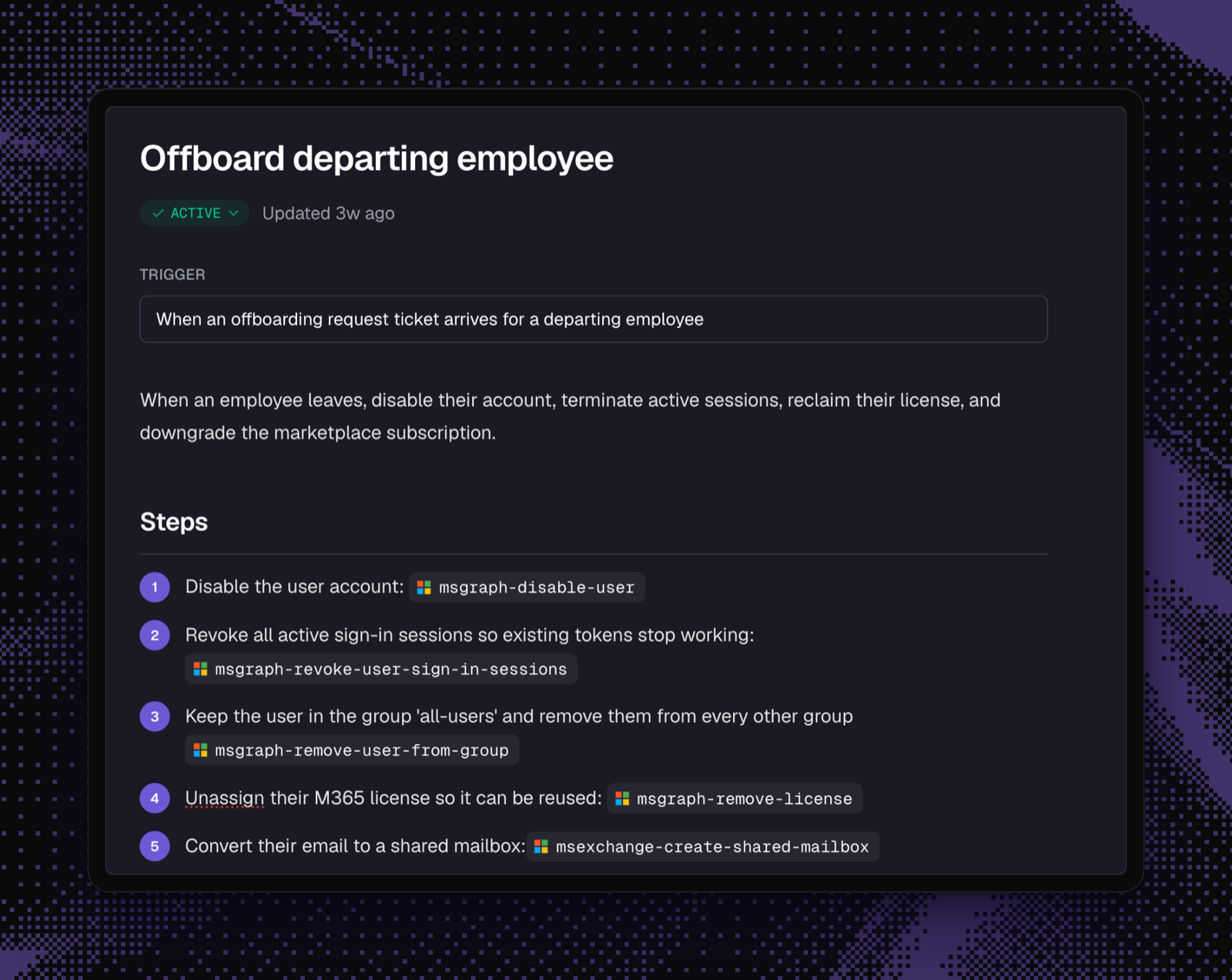
See how Rallied runs a fixAutomate any workflow in natural language
Instruct your AI agent to handle complex, multi-step workflows the same way a human would.
In-context chat, right in your PSA
Chat with the agent from the ConnectWise pod or the HaloPSA tab. It pulls relevant context from your PSA, RMM and docs to guide the technician to the correct next step.
Integrations
Works with the tools your service desk already uses
Connect your PSA, RMM, identity, documentation, and M365, and extend Rallied to niche or in-house tools when you need to. It’s not another dashboard for techs to manage.
 IT Glue
 Microsoft Teams
 Autotask
 Pax8
Pax8 ConnectWise PSA
 DattoMicrosoft 365
 NinjaOne
 HaloPSA
 Hudu
Hudu N-central
How it works
From setup to resolved tickets on day one
Other tools spend months learning your environment before they do anything. Rallied reads your PSA and documentation live, so there’s nothing to train, and how much it does on its own is up to you. Whatever it can’t finish, it hands to a tech already diagnosed, so no one starts from a blank ticket.
- 01Connect your stack
- Sign in to your PSA, RMM, identity, and documentation tools, and your clients come across in bulk from the PSA company list. There’s nothing to install on client machines.
- 02Choose how it runs
- Plan Mode posts what Rallied would do on every ticket. Execute Mode does the work and closes it. You decide per action and per client, so you can keep a tech in the loop and start with one client before switching on the rest.
- 03Make it follow your playbook
- Rallied handles tickets with its own judgment from the start. When you want a process done your way, write the workflow in plain English and it follows that instead. Everything it does lands in the PSA.
Customer story
How Cyber Solutions keeps routine tickets out of the tech room
One of my techs picked up a ticket this morning for software he’d never heard of. Rallied had already put everything he needed in the notes: what the software was, how we’d fixed it before, where to start. He closed it in 10 minutes. Our dispatchers are closing tickets now too, and those never even make it to the tech room.
- 100+
- tickets Rallied reads and enriches each day
- 10 min
- to close a ticket about unfamiliar software
- 1.5 hrs
- saved on the dispatcher’s daily ticket review
Security
You decide what Rallied can touch
Giving an AI access to client environments is a serious decision, so Rallied’s controls sit outside the AI: in a gateway it can’t bypass, tenant isolation it can’t see across, and approvals that validate the exact action before it runs. It starts in Plan Mode, and you decide how much authority it earns from there.
- A dedicated agent for every client you manage, so the “can Client A leak into Client B” question is answered by architecture, not by a policy promise
- Approvals aren’t instructions to the AI, they’re a wall in front of it: every action is checked outside the model, and approved plans run exactly as written
- Each client’s agent works tickets the way a tech does: it remembers the client, waits for approvals, and follows up on its own
- Password and MFA resets verify the requester with an Okta or Duo push before anything runs, so a hacked mailbox can’t reset a password
- Temporary passwords travel through one-time links that self-destruct; secrets never land in tickets or chat
- Every action, approval, and failure is on the record in the activity log
- SOC 2 Type II certified, GDPR ready, and your client data doesn’t train shared models
How long does it take to get started?
Most MSPs connect their PSA and go live within two weeks. Rallied starts in Plan Mode, showing what it would do without making changes, so you can check its work on real tickets first.
What happens when Rallied isn’t sure?
It hands the ticket to a tech. The diagnosis, client history, and next steps are already in the notes, so nobody starts from scratch.
Which PSAs do you support?
ConnectWise PSA, HaloPSA, Autotask, SuperOps, and Jira Service Management. Rallied begins work when a ticket reaches the status you choose.
How does pricing work?
$3 per resolved ticket, with a $150 monthly minimum that covers your first 50 resolutions. A resolved ticket is one where Rallied took action and the ticket then closed. Diagnosis, triage, and handoffs are free, and techs, clients, and tickets are unlimited.
You’d have access to every client’s credentials. How is that safe?
We keep credentials separate for every client and limit them to the action Rallied needs to take. Sensitive requests can require identity verification through Okta, Duo, or Traceless, and the audit log records exactly what ran and why. Rallied is SOC 2 Type II certified.
Couldn’t we just build this ourselves with Claude?
You can build a convincing demo with Claude. The hard part is everything that follows: client-by-client guardrails, vendor API changes, and making sure the whole team can run it without relying on the one person who built it.
Does client data train your models?
We don’t use your client data to train shared models. It stays in your tenant.
How much control do we have?
You can allow, require approval for, or disable each action, and set different rules for different clients. Password resets might run automatically while onboarding waits for approval. New connections start with conservative defaults, and you widen access as the agent earns it.
Show us the ticket your team is tired of seeing
Bring a shared mailbox request, a new-user setup, or another repeat ticket. We’ll show you how Rallied closes it, from request to done.