
A 30-second fix shouldn’t sit in the queue for an hour
Your AI teammate for MSP service operations
Rallied understands every ticket, automates next steps, and gets work done across your service desk stack, from your PSA to Microsoft 365, Pax8, RMM, and documentation.

Dana Powell
Riverside Realty
Please set up Leasing and Community Manager shared mailboxes for Parkview, and give Ben Carter access to both.

Patrick Reyes

Marcus Webb
Dana Powell just now
Please set up Leasing and Community Manager shared mailboxes for Parkview, and give Ben Carter access to both.
Rallied Agent just now
Executing approved plan…
- Create “Parkview – Leasing” shared mailbox in Microsoft 365
- Create “Parkview – Community Manager” shared mailbox
- Grant Ben Carter Full Access & Send As on both

Customer story
How Cyber Solutions keeps routine tickets out of the tech room
One of my techs picked up a ticket this morning for software he’d never heard of. Rallied had already put everything he needed in the notes: what the software was, how we’d fixed it before, where to start. He closed it in 10 minutes. Our dispatchers are closing tickets now too, and those never even make it to the tech room.

- 100+
- tickets Rallied reads and enriches each day
- 10 min
- to close a ticket about unfamiliar software
- 1.5 hrs
- saved on the dispatcher’s daily ticket review
The problem
What’s slowing your service desk down
Most queues aren’t full of hard problems. They’re full of routine requests waiting on a dispatcher to route them and a tech to pick them up.
Every ticket waits for a human
A client emails "my stuff don’t work." It sits in the queue for an hour, for a fix that takes 30 seconds.
Tickets get worked on arrival
Rallied picks it up the moment it hits the queue, pulls the client’s history, and gets to work.
Techs repeat the same fixes
Password resets, lockouts, mailbox access, onboarding. The standard churn stuff eats the day.
Routine fixes run without a tech
Rallied works them start to finish in the stack you already run, and escalates only what needs a tech.
AI tools stop at suggestions
They summarize the ticket and throw it over the fence to a tech anyway.
Rallied closes the ticket
It runs the fix, replies to the customer, and closes the ticket, with approval on the actions you choose.
The paperwork slips
Ticket notes get written up at 6pm, if at all, and the client record ends up with gaps.
The client record stays complete
Rallied documents every action on the ticket as it goes: the customer reply, the internal note, the outcome.
Features
Give the repeat work to Rallied
This is a real offboarding ticket, run start to finish.
Rallied checks the account, posts its plan on the ticket, and waits. One “approved” reply later, every step is done and documented, from the password reset to the license removal. The tech never left the PSA.
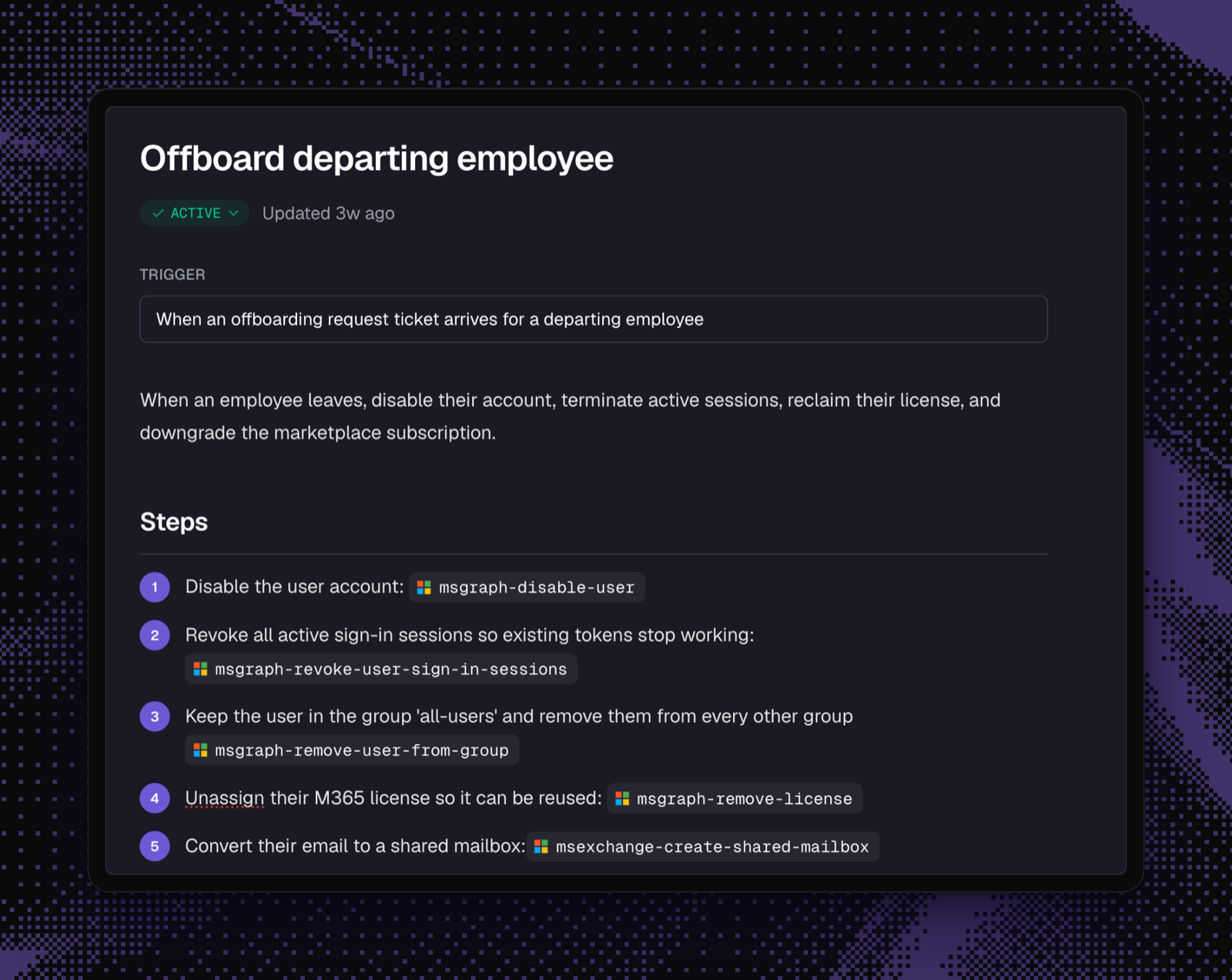
See how Rallied runs a fixWrite workflows in plain English
Describe the process the way you’d brief a tech, or start from a template. When a matching ticket arrives, Rallied follows your playbook and shows techs which steps it ran.
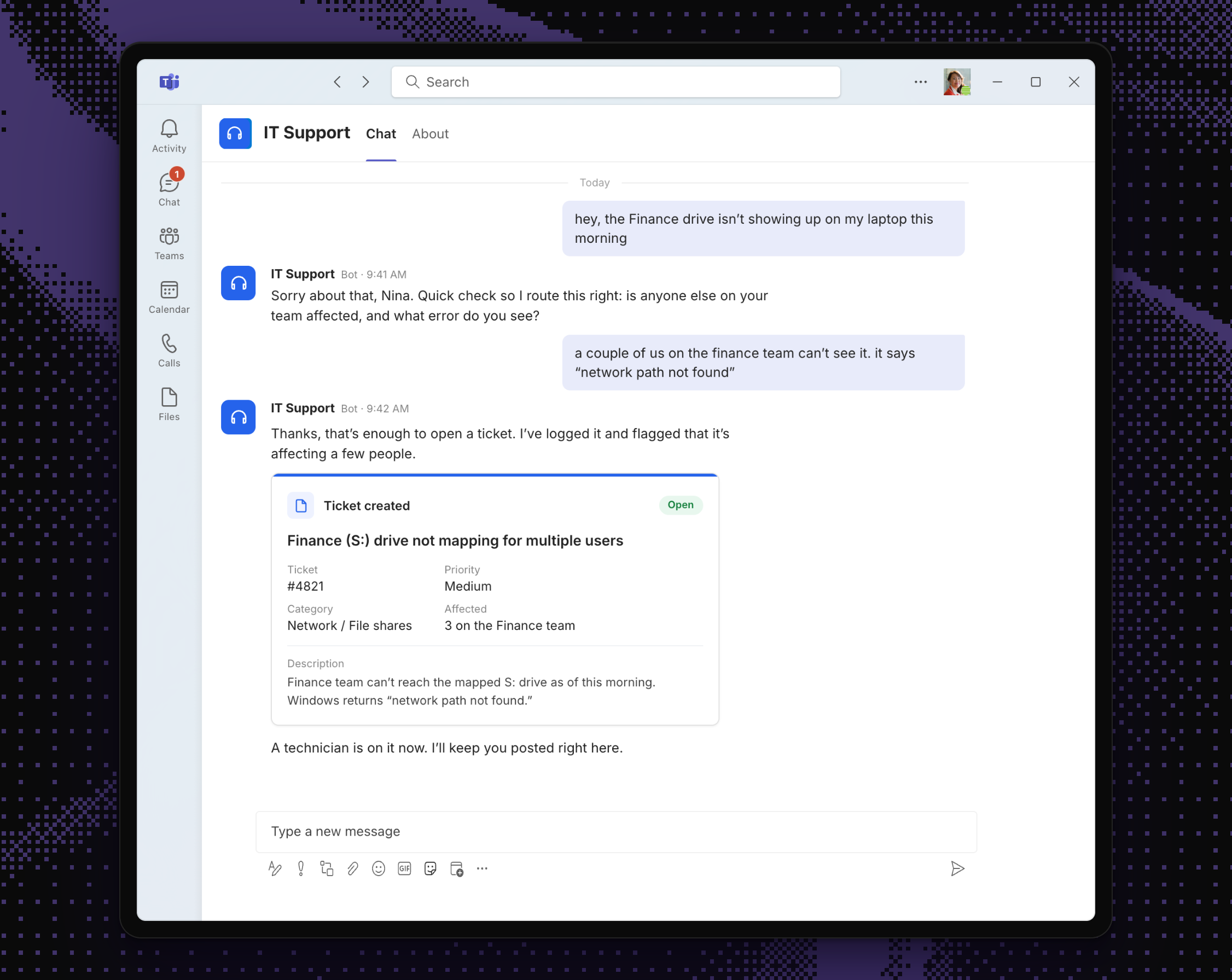
For end users, it’s just a Teams chat
They message IT Support the way they’d message a coworker. Rallied asks what it needs, opens a properly scoped ticket, and keeps them posted in the same chat.
- Documentation search with citations
- Rallied searches IT Glue, Hudu, and Confluence during ticket work and cites the source so techs can verify it.
- Identity verification
- Password and MFA resets can require the requester to confirm through Okta, Duo, or Traceless before Rallied acts.
- MSP-wide chat
- "Which clients have open VPN incidents?" "What’s blocking this ticket?" Ask once, get the answer across every client.
- AI phone agent
- Answers after-hours and overflow calls, captures the issue, and files a structured ticket with the transcript and recording.
Use cases
Start with the tickets your team sees every day
Password resets, access requests, common device issues. The work is familiar, but it still takes time. Rallied handles it from request to close.
After-hours coverage
Someone in an overseas office gets locked out at 2am. Rallied gets them back in without waking a tech.
Support that starts in chat
Clients ask for help in chat and stay in the thread. The ticket lands in the PSA with the conversation attached.
Grow without the next L1 hire
Take on a new client without immediately adding another L1 seat. Rallied handles more of the repeat work with the team you have.
Every ticket arrives prepped
When a ticket needs a tech, they open it to a diagnosis, the relevant history, and a clear place to start.
Close from the dispatch desk
Rallied posts its plan on the ticket. A one-line reply approves it, and the ticket closes before it reaches the tech room.
Ask Rallied inside ConnectWise
Techs can check client history and documentation, then have Rallied take the next step without leaving the ticket.
How it works
It works the ticket the way a good tech would
Rallied starts in Plan Mode: it can read your PSA and client tools, but it can’t change anything. From there you decide, action by action and client by client, what it runs on its own.
- 01Connect your stack
- Link your PSA, RMM, identity, and documentation tools through guided sign-in, then bring clients across in bulk from your PSA’s company list.
- 02Rallied does the work
- It picks tickets up from your PSA, diagnoses them with the client’s history and documentation, and runs the fixes you’ve allowed.
- 03Your techs stay in charge
- Rallied posts its plan as a ticket comment, and a tech approves, denies, or redirects it with a reply. You set the rules per action and per client.
- 04Everything lands in the PSA
- Rallied documents every diagnosis, action, and outcome on the ticket, so the client record stays complete and you can always see what it did.
Integrations
Works with the tools your service desk already uses
Connect your PSA, RMM, identity, documentation, and M365 through guided setup, and extend Rallied to niche or in-house tools when you need to. It’s not another dashboard for techs to manage.
 IT Glue
 Microsoft Teams
 Autotask
 Pax8
Pax8 ConnectWise PSA
 DattoMicrosoft 365
 NinjaOne
 HaloPSA
 Hudu
Hudu N-central
Security
You decide what Rallied can touch
Giving an AI access to client environments is a serious decision. Rallied starts in Plan Mode, where it investigates without making changes, and you decide how much authority it earns from there.
- Verifies the requester through Okta, Duo, or Traceless before password or MFA resets, so a hacked mailbox can’t reset a password
- Keeps each client’s agent and data separate, even on the shared systems you run across your customer base
- Lets you allow, require approval for, or disable each action per client; high-impact changes can also wait for the client manager’s sign-off
- Delivers temporary passwords through one-time links instead of posting them in the ticket or chat
- Records every approved action and its outcome on the ticket and activity history
- SOC 2 Type II certified and GDPR ready
- Doesn’t use your client data to train shared models
Customers
What MSP teams notice first
Our last automation tool worked, but only because someone spent all day keeping it alive. Rallied was working real tickets in the first week. We don’t have to babysit it.

The escalations sold me. When Rallied hands over a ticket, my tech isn’t starting from scratch. The diagnosis and client history are already there.

We watched it in read-only mode for a month and checked every ticket. Once it proved itself on password resets, we gave it a little more.
How long does it take to get started?
Most MSPs connect their PSA and go live within two weeks. Rallied starts in Plan Mode, showing what it would do without making changes, so you can check its work on real tickets first.
What happens when Rallied isn’t sure?
It hands the ticket to a tech. The diagnosis, client history, and next steps are already in the notes, so nobody starts from scratch.
Which PSAs do you support?
ConnectWise PSA, HaloPSA, Autotask, SuperOps, and Jira Service Management. Rallied begins work when a ticket reaches the status you choose.
How does pricing work?
Pricing is a flat monthly rate based on endpoint count. You won’t run into ticket meters or credit packs halfway through the month.
You’d have access to every client’s credentials. How is that safe?
We keep credentials separate for every client and limit them to the action Rallied needs to take. Sensitive requests can require identity verification through Okta, Duo, or Traceless, and the audit log records exactly what ran and why. Rallied is SOC 2 Type II certified.
Couldn’t we just build this ourselves with Claude?
You can build a convincing demo with Claude. The hard part is everything that follows: client-by-client guardrails, vendor API changes, and making sure the whole team can run it without relying on the one person who built it.
Does client data train your models?
We don’t use your client data to train shared models. It stays in your tenant.
How much control do we have?
You can allow, require approval for, or disable each action, and set different rules for different clients. Password resets might run automatically while onboarding waits for approval. New connections start with conservative defaults, and you widen access as the agent earns it.
Show us the ticket your team is tired of seeing
Bring a shared mailbox request, a new-user setup, or another repeat ticket. We’ll show you how Rallied handles it from request to close.